<?xml version="1.0" encoding="UTF-8"?>
<feed xmlns="http://www.w3.org/2005/Atom">
  <id>https://clutterstack.com</id>
  <updated>2026-01-22T18:43:00.360526Z</updated>
  <title>Clutterstack</title>
  <link rel="self" href="https://clutterstack.comfeed.xml"/>
  <author>
    <name>Chris Nicoll</name>
  </author>
  <entry>
    <id>https://clutterstack.com/posts/2026-01-09-agent-schmagent-tools-cool</id>
    <title>Agent, schmagent (but tools are cool)</title>
    <updated>2026-01-09T00:00:00.000Z</updated>
    <link rel="alternate" href="https://clutterstack.com/posts/2026-01-09-agent-schmagent-tools-cool"/>
    <content type="html"><![CDATA[<p> Thomas Ptacek says everybody <a href="https://fly.io/blog/everyone-write-an-agent/">Should Write An Agent</a>, because <code class="inline">It&#39;s Incredibly Easy</code>.</p> <p> You can indeed have your very own agent in a matter of a few dozen (pretty-printed!) lines of Python plus API access to a tool-call-capable LLM, per Simon Willison’s definition: <a href="https://simonwillison.net/2025/Sep/18/agents/">“an LLM agent runs tools in a loop to achieve a goal”</a>. </p> <p> Thomas illustrates this with a chat client for the OpenAI <a href="https://platform.openai.com/docs/api-reference/responses">Responses API</a> that lets GPT-5 get local <code class="inline">ping</code> times for a target, if that helps it reply to the user.</p> <p> I built an agent too. I swapped OpenAI’s API and SDK out in favour of Ollama’s, in front of Qwen3 models. Now I, too, have a <a href="https://gist.github.com/clutterstack/7f84b8a74b41f1db2c3caf7b74a8cd3c">chat client</a> that can run code on my computer and respond autonomously when an LLM needs some <code class="inline">ping</code> data. I’m a modern Prometheus!</p> <aside class="sidenote rowspan-1 "> <p> Some notes: <a href="/particles/lagan/2025-12-21-llm-chat-client-agentic">Making an LLM chat client agentic</a></p> </aside> <p> It <em>was</em> simple to implement. But now I had a lot of questions. What’s happening on the other side of the API boundary, to make it so simple on this side of it? How does a model “make a tool call”? How do I design the <em>best</em> <code class="inline">ping</code> tool?</p> <p> There was a lot of scenery in between me and a proper appreciation of how incredibly easy it was. I’m writing this to share the scenery.</p> <h2> Wait: are tools in a loop really <em>agentic</em>?</h2> <p> That question is backwards, isn’t it? It’s chasing AI buzzwords. But I’m suitably impressed by the fact that my little Python script, talking to <code class="inline">qwen3:1.7b</code> on my 16GB Mac, can answer <code class="inline">how&#39;s my connectivity to google?</code> without asking me to ping google myself. </p> <p> So looking at it frontwards, <em>agent</em> seems like a perfectly serviceable word for this—<em>this</em> being the combination of the Python client, the API and backend, and the LLM. And tool use is the key.</p> <p> …did you notice that we haven’t defined “tool”? </p> <h2> Tool use is an API feature</h2> <p> Here’s what I know after making a minimal agent with Ollama and Qwen3. </p> <ul> <li> I put into an API request payload: JSON schemas for my custom functions, a system prompt, and a list of messages. </li> <li> I get back a message with separate fields for natural language and tool calls. </li> <li> And the tool calls, if they come, always come in the same format and refer to one of the functions I described in a schema. </li> </ul> <aside class="sidenote rowspan-1 "> <p> Technically, my system prompt goes into a message too, attributed to the <code class="inline">&quot;system&quot;</code> role.</p> </aside> <p> So in this setting, we’re talking about an API feature: a universal adapter to allow API customers to plumb in custom functions to their LLM clients for the model to invoke. </p> <p> OpenAI <a href="https://openai.com/index/function-calling-and-other-api-updates/">announced “function calling”, the API feature, in June 2023</a>. It was enough of a game changer that Anthropic <a href="https://www.anthropic.com/news/claude-2-1">had a beta version of its own (“tool use”) to go along with Claude 2.1 by November</a>.</p> <p> It’s all a bit shadows-on-the-cave-wall. I may need to know how this works if I want to do something more sophisticated than <code class="inline">ping</code>.</p> <p> Apropos that: if you’ve been putting it off, I highly recommend taking the time to watch Andrej Karpathy’s primer, <a href="https://youtu.be/7xTGNNLPyMI"><em>Deep Dive into LLMs like ChatGPT</em></a>. It doesn’t demand deep concentration, and just doing the first half at 1.5x speed can save hours of wading through hype and slop.</p> <h2> Tool use is baked into model weights</h2> <p> Behind the API is a model that knows how, given a string of tokens—the context—that contains schemas, messages, and a system prompt, to emit—when it makes sense to!—a string of tokens containing a list of <code class="inline">tool_calls</code> that the backend can isolate and pass to my client. Which the client can, in turn, recognise as valid function calls.</p> <p> A model gets good at following this pattern through training—specifically, “supervised fine tuning” (SFT)—on full examples of that behaviour.</p> <p> It’s similar to how a base model—a <a href="https://youtu.be/7xTGNNLPyMI?si=QwmlmBjkxF1VF0lv&t=3563">“token-level internet document simulator”</a>—can learn to role-play consistently as an <code class="inline">assistant</code> having a conversation with us, but with more rigorous constraints on the output structure.</p> <p> The point is that if I’m using a tool-calling API feature, the ability to participate in <em>this API feature</em> is baked into the model weights. If I control the system end-to-end, I can fine-tune for different structured output, given different contextual clues.</p> <aside class="sidenote rowspan-2 "> <p> If I don’t have control over the training or the API, I can try to use <a href="https://www.youtube.com/watch?v=7xTGNNLPyMI&t=3391s">“in-context learning”</a> with <a href="https://youtu.be/7xTGNNLPyMI?si=M6eNt3bBL4vYas5E&t=3356">“few-shot”</a> or <a href="https://platform.claude.com/docs/en/build-with-claude/prompt-engineering/multishot-prompting">“multishot”</a> prompting—including examples of the whole pattern in the context.</p> </aside> <p> For example, if my agent will have occasion to get information from the web a lot, I can consider fine-tuning for a specialised contract that kicks off some web-search machinery directly, rather than squeezing it through the generic tool-use interface first.</p> <p> In the spirit of the <a href="https://simonwillison.net/2025/Sep/18/agents/">tools-in-a-loop criterion for…agency? agenticness?</a>, that would be a tool, too.</p> <h2> Tools are code an LLM can ask to run</h2> <p> LLMs are good at mimicking syntax conventions. Tools are code that an LLM can invoke by emitting structured output with a pre-agreed syntax.</p> <p> <strong>Tools let us use something LLMs are good at to stop using them for things they suck at.</strong></p> <h2> Clarifying the context</h2> <p> I still couldn’t picture how the context gets assembled from all the stuff in the API payload in order to elicit this tool-calling behaviour.</p> <p> We can’t look at how OpenAI’s backend composes this final string, but we can see how Ollama does it: it processes the API request through a template (<a href="https://ollama.com/library/qwen3:1.7b/blobs/ae370d884f10">here’s the one for <code class="inline">qwen3:1.7b</code></a>) based on what Ollama contributors know about what the model expects—e.g. <a href="https://qwen.readthedocs.io/en/latest/framework/function_call.html">from docs</a>.</p> <aside class="sidenote rowspan-1 "> <p> The model expects the context as token IDs, so Ollama hands the string to llama.cpp and llama.cpp tokenises it.</p> </aside> <p> The Qwen3 template uses everything to add structure: JSON, Markdown headings, and XML tags, plus dedicated tokens (<a href="https://youtu.be/7xTGNNLPyMI?si=HFA9d6GWHfxeHPAV&t=3989">for, e.g. <code class="inline">&lt;|im_start|&gt;</code> and <code class="inline">&lt;|im_end|&gt;</code></a>) that encode the conversation format unambiguously. </p> <p> If the user supplies schemas in a <code class="inline">tools</code> field, they’re included as part of the system prompt, along with instructions for their use, including the format to use for a function call:</p> <pre><code>&lt;tool_call&gt; {&quot;name&quot;: &lt;function-name&gt;, &quot;arguments&quot;: &lt;args-json-object&gt;} &lt;/tool_call&gt;</code></pre> <p> The model reliably follows this pattern, so the backend can package the <code class="inline">tool_calls</code> into a list, inside a message, in an API response.</p> <h2> Unix utilities are not tool-shaped</h2> <p> A cool <code class="inline">ping</code> demo tool notwithstanding, The Platonic ideal of an LLM tool call doesn’t map 1:1 to the Platonic ideal of a Unix shell utility. Nobody told me it did! I bring it up because I might have missed the mismatch if I hadn’t tried to give my agent a <code class="inline">ps</code> tool.</p> <p> In contrast to <a href="https://www.gnu.org/software/bash/manual/html_node/Shell-Commands.html">utilities running in a Unix shell</a>, LLM tools, the implementation we’re talking about here, don’t compose. The model can call multiple tools in one turn, but they don’t feed into one another. Each tool does its own thing, and then we can tell the model about everything that happened. </p> <p> <code class="inline">ps</code> is confident that it’s not alone: that, as a human trying not to drown in hundreds of lines of <code class="inline">ps aux</code> output, I can pipe it into <code class="inline">head</code> or <code class="inline">grep</code> or <code class="inline">awk</code>. If I want my <code class="inline">ps</code> LLM tool to return the first 10 lines of <code class="inline">ps</code> output, I need to build truncation into it—there’s no <a href="https://www.gnu.org/software/bash/manual/html_node/Pipelines.html">pipeline operator</a> to connect it to a <code class="inline">head</code> tool. And with that, my tool ceases to be <code class="inline">ps</code>-shaped.</p> <aside class="sidenote rowspan-2 "> <p> It’s true that Claude and GPT-5 can digest the entire output and return a meaningful summary, if not a surgical one, but not all useful models are mammoths.</p> </aside> <p> That’s all I’m saying. Good LLM <code class="inline">tools</code> are analogous to the whole shell command when you hit <code class="inline">Enter</code>, whether that’s a single Unix utility or a pipeline, and whether you use existing binaries under the hood or write all new code.</p> <h2> But are they good <em>inside</em> tools?</h2> <p> Too many variables! What I know is that LLMs are really good at them. It’s enough to tell a model, “here’s a tool that runs BSD <code class="inline">ps</code> with the args you provide” for the model to (a) know when to call that tool, and (b) rummage around in its weights and pull out <code class="inline">ps -o pid,pcpu,etime,user,command -r</code> fully formed.</p> <aside class="sidenote "> <p> Admittedly the Qwen models I’m using locally need a little more info in the tool description to pull this off, or they try to sort with the GNU <code class="inline">--sort</code> option.</p> </aside> <p> I gave my <code class="inline">ps</code> tool a single parameter that’s an array of <code class="inline">args</code>, and let the model freestyle them all. My agent can accept a function call with <code class="inline">name=&#39;ps&#39;, arguments={&#39;args&#39;: [&#39;-o&#39;, &#39;pid,pcpu,etime,user,command&#39;, &#39;-r&#39;]}</code>. The model has to work backward from the complete command to fit it into my tool, but even the 600-million-parameter Qwen3 model does that part fine.</p> <p> I like this a lot! I don’t have to clutter my context with a lot of individual <code class="inline">ps</code> options. They’re already trained-in. I bet I could add an option to truncate the output, without losing the advantage of LLMs being able to spit out whole Unixy incantations. </p> <p> But maybe it’s actually more efficient if every tool is semantically named, like <code class="inline">get_topk_processes</code>, with, in turn, well-defined and semantic options. (Built with Unix binaries, or not.) </p> <p> And that’s not to mention the great-power/great-responsibility option: making the tool a shell and letting the model straight-up propose any pipeline it wants.</p> <h2> Prompt engineering is real, or at least stuck to the wall</h2> <p> No training corpus has my custom functions in it, obviously. </p> <aside class="sidenote rowspan-2 "> <p> Lalala I am not getting nerd-sniped into fine-tuning anything right now.</p> </aside> <p> The model knows the tool-calling pattern. For success with a given custom function, it depends on my schema, my system prompt, and my other prompts to figure out when to use it, which args to use, and how to interpret the output.</p> <p> Claude and GPT-5 deal very well with sloppy contexts, but the less overpowered the model, the more prompt engineering matters. <code class="inline">qwen3:0.6b</code> can get a <code class="inline">ping</code> tool to run, but needs me to add the <code class="inline">.com</code> to <code class="inline">google</code>. With a pointed system prompt, it can get past that hurdle. Some of the time.</p> <p> I’m definitely not attached to the term “prompt engineering”. “Context engineering” is <em>massively</em> important, but, I think, too broad a term. I’m talking about the part of that that’s just trying different wordings to nudge an LLM to emit the magic tokens. The very nature of that activity strikes me as more absurd than the name.</p> <aside class="sidenote rowspan-2 "> <p> Conscious that if I disagree with <a href="https://x.com/karpathy/status/1937902205765607626?lang=en">Andrej Karpathy</a> on anything to do with LLMs, I’m probably not done thinking.</p> </aside> <p> In any case, the “prompt engineering” farfalle flew across the room years ago and the wall is <a href="https://platform.openai.com/docs/guides/prompt-engineering">studded</a> with <a href="https://platform.claude.com/docs/en/build-with-claude/prompt-engineering/overview">petrified bowties.</a> It’ll be a job to scrape them all off now.</p> <h2> Complicated &gt; mysterious</h2> <p> Tool use is the key to self-service reality checks for LLMs, and <a href="https://kottke.org/25/12/this-ai-vending-machine-was-tricked-into-giving-away-everything">stochastic spice</a> for automations. </p> <p> If that’s at all spooky to you, like it was to me, I agree: build an agent! Just know, going in, that it’s hard to do <code class="inline">ping</code> and walk away.</p> <p> Once you’ve seen how to manage a simple message history, and got one tool call to work, a lot of other stuff comes into view. You start having neat ideas for more specialised, parsimonious, autonomous, secure agents. Some of those ideas are chores, like validation and error handling. <em>Incredibly easy</em> becomes more complicated when you dot your <em>i</em>‘s and cross your <em>t</em>‘s, but even the tedium feels compelling when all there was before was mystery.</p>]]></content>
  </entry>
  <entry>
    <id>https://clutterstack.com/particles/lagan/2025-12-21-llm-chat-client-agentic</id>
    <title>Making an LLM chat client agentic</title>
    <updated>2025-12-21T00:00:00.000Z</updated>
    <link rel="alternate" href="https://clutterstack.com/particles/lagan/2025-12-21-llm-chat-client-agentic"/>
    <content type="html"><![CDATA[<p> Say you have a minimal LLM chat client that does the following:</p> <ul> <li> Wait for the user to input a prompt </li> <li> Add a message to chat history containing the user input </li> <li> Send any system prompt (or none) + full chat history to the model (via API) </li> <li> Add the completion from the model to chat history </li> <li> Repeat </li> </ul> <p> <a href="https://gist.github.com/clutterstack/9946f3729b0040222130354392294001">Here’s mine in a gist.</a></p> <p> To transform that into an agent:</p> <ul> <li> Write a schema for each tool, to tell the model what it’s good for and which arguments it takes </li> <li> Write the function that runs when the model asks for a given tool </li> <li> Send all the tool schemas in the API request payload along with the message history </li> <li> Add an “agent” loop that checks for a list of tool calls in the API response, and <ul> <li> runs each tool call’s function, tacking a message containing each function’s output onto the chat history </li> <li> makes the next API call containing the snowballing history </li> </ul> </li> </ul> <p> When the model produces a tool call, it’s the client that turns the crank on the next inference run. When there’s no tool call, we pop out of the loop, display the output, and wait for the user to prompt again.</p> <p> <a href="https://gist.github.com/clutterstack/7f84b8a74b41f1db2c3caf7b74a8cd3c">Here’s my <code class="inline">ping</code>-enabled agent for a local Ollama-hosted model.</a></p>]]></content>
  </entry>
  <entry>
    <id>https://clutterstack.com/posts/2025-09-07-copacetic-keybindings</id>
    <title>Copacetic keybindings for my TUI on MacOS</title>
    <updated>2025-09-07T00:00:00.000Z</updated>
    <link rel="alternate" href="https://clutterstack.com/posts/2025-09-07-copacetic-keybindings"/>
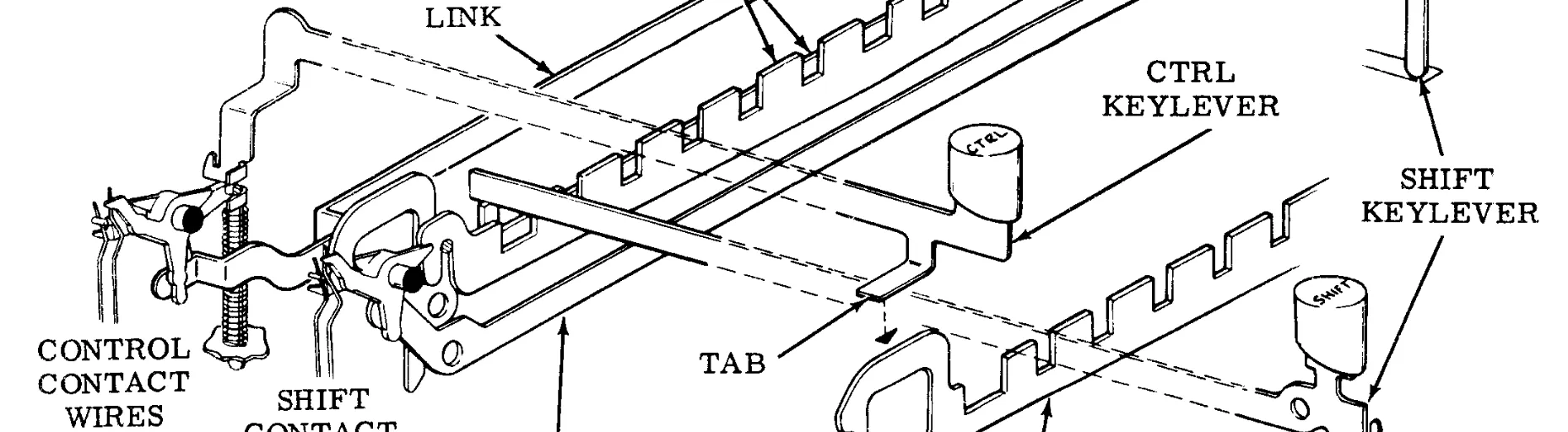
    <content type="html"><![CDATA[<p> <img src="/images/posts/codebars.webp" alt="Portion of a diagram of the electromechanical keyboard mechanism on a Teletype Model 33 terminal, showing the action of the shift and ctrl keys"> </p> <aside class="sidenote rowspan-1 "> <p> Image: crop of Figure 10 from Teletype’s <em>33 KEYBOARD GENERAL DESCRIPTION AND PRINCIPLES OF OPERATION</em> (<a href="https://deramp.com/downloads/teletype/Model%2033/TTY-33%20Theory%20of%20Operation.pdf">7.6MB PDF at deramp.com</a>)</p> </aside> <p> I have a personal <a href="/posts/2025-07-31-claude-wrote-me-a-tui-all-i-got-was-this-stupid-tui">TUI text-editor app thingy</a> that runs in a terminal emulator. </p> <aside class="sidenote rowspan-2 voluble" class="sidenote rowspan-2 "><p> Made with the <a href="https://ratatui.rs/">Ratatui</a> library, using (a fork of) the <a href="https://crates.io/crates/tui-textarea">tui-textarea</a> widget for editing.</p></aside> <p> One of my main ambitions for this program was that it should be intuitive to use, for my personal value of intuitive. Ideally, the editor should work like this on my Mac:</p> <ul> <li> <code class="inline">Ctrl-Enter</code> or <code class="inline">Cmd-Enter</code> to “submit” a thing </li> <li> <code class="inline">Ctrl-X/C/V</code> or <code class="inline">Cmd-X/C/V</code> to copy/cut/paste text </li> <li> Arrow keys to move the cursor </li> <li> <code class="inline">Option-Left/Right Arrow</code> to move by a word (where <code class="inline">Option</code> is AKA <code class="inline">Alt</code>) </li> <li> <code class="inline">&lt;Some modifier&gt;-Left/Right Arrow</code> for Home and End </li> </ul> <p> Some of this fights terminal-emulator norms. </p> <p> Because I put the cart before the horse (vibe coding), I bumped up against constraints by trial and error, which left me with only a vague understanding and a bunch of superfluous code.</p> <p> I am back to nail down what’s copacetic and what needs a workaround. This stuff is fascinating to me because there’s so much of it that I’ve never really thought about, which means there may be errors.</p> <h2> Why are there any constraints?</h2> <p> Because terminal emulation isn’t skin deep; it’s the outcome of continuous evolution from the 1960s and ‘70s when hardware terminals and computers communicated by a limited set of character codes.</p> <aside class="sidenote rowspan-1 voluble" class="sidenote rowspan-1 "><p> Most manufacturers agreed on <a href="https://en.wikipedia.org/wiki/ASCII">ASCII</a> character encoding for interoperability. IBM was stubborn about its proprietary <a href="https://en.wikipedia.org/wiki/EBCDIC">EBCDIC</a>.</p></aside> <p> In 1971, it was possible to type commands like <code class="inline">ls</code>, <code class="inline">cat</code>, <code class="inline">chmod</code>, and <code class="inline">rm</code> on a <a href="https://en.wikipedia.org/wiki/Teletype_Model_33">Teletype Model 33</a> to execute them on a <a href="https://en.wikipedia.org/wiki/PDP-7">DEC PDP-7</a> minicomputer running the <a href="https://www.nokia.com/bell-labs/about/dennis-m-ritchie/1stEdman.html">first edition of Unix</a>.</p> <aside class="sidenote rowspan-1 voluble" class="sidenote rowspan-1 "><p> That Unix, and that <code class="inline">ls</code> (et al.), predated C and were written in assembly language! </p></aside> <p> Somehow, after decades of nerdery and market forces, the fingerprints of that Teletype remain all over the terminal emulator you use to SSH into a Linux VM and run <code class="inline">ls</code>, <code class="inline">cat</code>, <code class="inline">chmod</code>, and <code class="inline">rm</code>. </p> <aside class="sidenote rowspan-3 voluble" class="sidenote rowspan-3 "><p> The Teletype 33, whose keyboard generated ASCII by elaborate electromechanical workings, and which printed (<a href="https://www.pdp8online.com/asr33/asr33.shtml">or punched</a>) its output to paper, was released in <a href="https://en.wikipedia.org/wiki/Teletype_Model_33#/media/File:Teletype_Model_33_Terminal_June_1974.jpg">1962</a> or 1963, and wasn’t discontinued until <a href="https://archive.org/details/byte-magazine-1980-12/page/n215/mode/1up?view=theater">1981</a>. Its production just about overlapped with the release of the IBM PC. It wasn’t even the last Teletype model.</p></aside> <p> And, somehow, Unix paradigms underlie most of our OSes, including MacOS, where I’m running my program.</p> <p> Unix’s <a href="https://www.linusakesson.net/programming/tty/">TTY subsystem</a> let programs trade ASCII bytestreams with a Teletype or video terminal. The kernel would interface with your user-space program (the <a href="https://en.wikipedia.org/wiki/Thompson_shell"><code class="inline">sh</code></a> command interpreter; the <a href="https://en.wikipedia.org/wiki/Ed_(software)"><code class="inline">ed</code></a> editor) at one “end”, and at the other end it would drive hardware to shuttle ASCII to and from serial <a href="https://en.wikipedia.org/wiki/Current_loop">current</a> or <a href="https://en.wikipedia.org/wiki/RS-232">voltage</a> signals.</p> <p> <a href="https://en.wikipedia.org/wiki/History_of_the_Berkeley_Software_Distribution">4.2BSD</a> (a Unixy OS) introduced the <a href="https://man.freebsd.org/cgi/man.cgi?query=pty&sektion=4">pseudoterminal (PTY) driver</a> in 1983 to let user-space programs interface with <em>both</em> ends of the TTY subsystem. Now you could replace your hardware terminal with a software terminal <em>emulator</em>, running on the same computer as your shell. </p> <aside class="sidenote rowspan-1 "> <p> You did also need, you know, keyboard and display hardware, and kernel drivers for them.</p> </aside> <p> And that’s <em>basically</em> what happens under MacOS in 2025. My terminal emulator and my shell (or my TUI blogging program) communicate by passing bytes back and forth through the kernel TTY subsystem, via PTY <a href="https://en.wikipedia.org/wiki/Device_file#Pseudo-devices">pseudo-devices</a>.</p> <aside class="sidenote rowspan-1 voluble" class="sidenote rowspan-1 "><p> The bytes are now <a href="https://www.utf8.com/">UTF-8</a>, the first 128 codes of which are the 7-bit ASCII codes. </p></aside> <p> As a regular GUI program, the emulator can decide which bytes, if any, to push when it receives an input event from the OS. <em>By default,</em> it’ll map key events the way that my shell, SSH, and that remote Linux VM expect, and that won’t match my GUI-centric keybinding preferences.</p> <aside class="sidenote rowspan-1 voluble" class="sidenote rowspan-1 "><p> The OS gets first dibs on input events, obviously. </p></aside> <p> My TUI program squats in the terminal emulator because I like a text-based interface. Because it’ll reconstitute my little bit of logic into a whole lightweight UI, no platform-specific development required. The fastidiously tended compatibility is something I sometimes have to work around.</p> <aside class="sidenote rowspan-2 voluble" class="sidenote rowspan-2 "><p> I have to put this somewhere: <a href="https://www.youtube.com/watch?v=2XLZ4Z8LpEE">Using a 1930 Teletype as a Linux Terminal (YouTube video by CuriousMarc)</a>. This Teletype transmitted at 45.5 baud and used the 5-bit Baudot code, not ASCII, which as CuriousMarc points out would make it really hard to use as a daily driver.</p></aside> <h2> <code class="inline">Ctrl-Enter</code> doesn’t work</h2> <p> The 7-bit ASCII character set <a href="https://en.wikipedia.org/wiki/ASCII#History">took most of the 1960s</a> to stabilise. The initial standard, <a href="https://www.sensitiveresearch.com/Archive/CharCodeHist/X3.4-1963/index.html">ASA X3.4-1963</a>, had some unassigned codes. By <a href="https://archive.org/details/enf-ascii-1968-1970/mode/2up">1968</a>, they’d given in and used most of them for lowercase letters.</p> <aside class="sidenote rowspan-2 voluble" class="sidenote rowspan-2 "><p><a href="https://ecma-international.org/publications-and-standards/standards/ecma-6/">ECMA-6</a> is the same thing, but without the <code class="inline">American</code> branding, and free to download. There’s an <a href="https://www.iso.org/standard/4777.html">ISO version</a> too.</p><p> Copious documentation of international bikeshedding <a href="https://archive.org/search?query=Source+documents+on+the+history+of+character+codes+creator%3A%22Compiled+by+Eric+Fischer%22">uploaded to the Internet Archive by Erica Fischer</a>.</p></aside> <p> Of the 128 ASCII codes, 95 represent printable, or “graphic”, characters—“text”. The other 33 are <a href="https://www.ascii-code.com/characters/control-characters">control codes</a> for stuff like coordinating communication and manoeuvring print heads and paper.</p> <p> The ASCII table was painstakingly arranged so that you could get to 32 of the control codes by zeroing the 6th and 7th bits on 32 of the printable characters. Which is what the <code class="inline">CTRL</code> modifier key did on the Teletype 33, and on video terminals like DEC’s VT series (starting with the 1970 <a href="https://terminals-wiki.org/wiki/index.php/DEC_VT05">VT05</a>) and the 1976 <a href="https://terminals-wiki.org/wiki/index.php/Lear_Siegler_ADM-3A">Lear Siegler ADM-3A</a>. </p> <aside class="sidenote rowspan-4 voluble" class="sidenote rowspan-4 "><p> Since the Teletype 33 dates from the days when there were no lowercase letters in ASCII, the letter keys produced uppercase codes (<a href="https://deramp.com/downloads/teletype/Model%2033/TTY-33%20Theory%20of%20Operation.pdf">7.6MB manual PDF</a>). The <code class="inline">CTRL</code> key forced the 7th bit to 0 and blocked you from pressing any keys that had a non-zero 6th bit. </p><p> The <code class="inline">SHIFT</code> key flipped the 5th bit, which sounds elegant and worked out electromechanically, but made for some awkward-looking matchups (<a href="https://kbd.news/Teletype-Model-33-1274.html">good Teletype 33 keyboard pix</a>). To be fair, these probably didn’t look so bonkers when most of the last two columns of ASCII didn’t exist.</p></aside> <p> For completeness: the 33rd control code, <code class="inline">DEL</code>, lives in the last slot on the 7-bit ASCII chart, which is <code class="inline">1111111</code>—good for deleting a character on paper tape by going back to its position and punching all the holes.</p> <p> Back to <code class="inline">Ctrl-Enter</code>. </p> <p> There were a few control codes you’d commonly want to send from the terminal, and it became normal on video terminals to have keys for them: <code class="inline">HT</code> (horizontal tab), <code class="inline">BS</code> (backspace), <code class="inline">LF</code> (line feed), <code class="inline">DEL</code> (delete), and <code class="inline">CR</code> (carriage return), emitted by the <code class="inline">RETURN</code> or <code class="inline">ENTER</code> key (or both, <a href="https://www.vt100.net/docs/vt100-ug/chapter3.html#S3.1">as the case may be</a>).</p> <p> So <code class="inline">ENTER</code> is already a control code; <code class="inline">CTRL-ENTER</code> would be like <code class="inline">CTRL-CTRL-M</code>, which is not, historically, a thing. If you mask the top two bits of <code class="inline">CR</code> you get <code class="inline">CR</code> again, which is how <code class="inline">Ctrl-Enter</code> acts in iTerm2 by default. </p> <aside class="sidenote rowspan-1 voluble" class="sidenote rowspan-1 "><p><a href="https://github.com/ghostty-org/ghostty/discussions/3151#discussioncomment-11678138">GhosTTY has something different going on.</a></p></aside> <p> Again, in 2025 we’re allowed way more key events than just ASCII codes, and I <em>can</em> get around this by setting a custom keybinding on an iTerm2 profile; I checked. I’m still loath to do it.</p> <h2> <code class="inline">Cmd-Enter</code> doesn’t work either</h2> <p> Or, I should say: <code class="inline">Cmd-Return</code> doesn’t work either. </p> <aside class="sidenote rowspan-2 voluble" class="sidenote rowspan-2 "><p> Old terminal manuals use all caps to indicate key names, but I’m happy to relax into something quieter for the present day.</p></aside> <p> In principle it could, since it generates a key event and the <code class="inline">command</code> key on my Apple computer isn’t mentioned in any ANSI standard from 45 years ago. </p> <p> But equally, combinations that aren’t spoken for by any ASCII code are in danger of being claimed by MacOS and terminal emulator programs. </p> <p> <code class="inline">Cmd-Return</code>‘s default behaviour in both GhosTTY and iTerm2 is to toggle full-screen mode, so I’d have to change that setting (if possible) and <em>then</em> add the custom keybinding.</p> <p> I admitted defeat and set <code class="inline">Ctrl-S</code> as my shortcut for submitting changes to a text entry.</p> <h2> Arrow keys work fine, thanks to escape sequences</h2> <p> All the ASCII control codes were used up by the time video terminals needed a way to move a cursor around on a screen.</p> <p> The VT05 “solved” this by just <a href="https://vt100.net/docs/vt05-rm/chapter1.html#S1.2.1">commandeering some control codes</a> for arrow keys. </p> <table> <thead> <tr> <th style="text-align: left;"> Key </th> <th style="text-align: left;"> Code </th> <th style="text-align: left;"> ASCII control </th> </tr> </thead> <tbody> <tr> <td style="text-align: left;"> up </td> <td style="text-align: left;"> <code class="inline">CTRL-Z</code> </td> <td style="text-align: left;"> <code class="inline">SUB</code> (<code class="inline">SUBSTITUTE</code>) </td> </tr> <tr> <td style="text-align: left;"> down </td> <td style="text-align: left;"> <code class="inline">CTRL-K</code> </td> <td style="text-align: left;"> <code class="inline">VT</code> (<code class="inline">VERTICAL TABULATION</code>) </td> </tr> <tr> <td style="text-align: left;"> right </td> <td style="text-align: left;"> <code class="inline">CTRL-X</code> </td> <td style="text-align: left;"> <code class="inline">CAN</code> (<code class="inline">CANCEL</code>) </td> </tr> <tr> <td style="text-align: left;"> left </td> <td style="text-align: left;"> <code class="inline">CTRL-H</code> </td> <td style="text-align: left;"> <code class="inline">BS</code> (<code class="inline">BACKSPACE</code>) </td> </tr> </tbody> </table> <p> If your terminal and your program agreed, this worked. These codes weren’t otherwise relevant to the VT05.</p> <p> I had a quick look on the webs, and I’m not sure what this was actually good for (aside from <code class="inline">BACKSPACE</code>). It seems there wasn’t a lot of software that used this kind of cursor movement in the very early 1970s, and you’d have to write your software specifically to understand the control codes in this custom way.</p> <aside class="sidenote rowspan-1 "> <p> <a href="https://www.gnu.org/software/termutils/manual/termcap-1.3/html_mono/termcap.html"><code class="inline">termcap</code></a> and <a href="https://tldp.org/HOWTO/Text-Terminal-HOWTO-16.html"><code class="inline">terminfo</code></a> later let programs look up the capabilities of the connected terminal.</p> </aside> <p> You couldn’t really standardise on this approach, because other devices still existed that did use the canonical meanings.</p> <p> But <code class="inline">ESC</code>, sitting in one of those 128 precious ASCII slots, offers a more elegant option: it’s <code class="inline">a prefix affecting the interpretation of a limited number of contiguously following characters.</code> That is, it starts an <em>escape sequence</em>. Escape sequences vastly increase the number of possible signals by letting us bundle multiple ASCII codes together.</p> <aside class="sidenote rowspan-1 voluble" class="sidenote rowspan-1 "><p> That wording exists in the <a href="https://ia600401.us.archive.org/23/items/enf-ascii-1968-1970/Image070917151315.pdf">24MB ANSI X3.4-1968 PDF</a>, but easier to grab from Vint Cerf’s <a href="https://datatracker.ietf.org/doc/html/rfc20#section-5.2">RFC20 (1969)</a> (“let’s use ASCII between networked computers”)</p></aside> <p> There was a standard for the purpose and general form of escape sequences in 1971, but which sequence of codes to use for what was still freeform.</p> <aside class="sidenote rowspan-1 voluble" class="sidenote rowspan-1 "><p> That’s <a href="https://ecma-international.org/publications-and-standards/standards/ecma-35/">ECMA-35</a>, and the corresponding ANSI X3.41.</p></aside> <p> The 1975 VT52 <a href="https://vt100.net/docs/vt52-mm/chapter3.html#T3-7">used</a> <code class="inline">ESC A</code> to move up one line; <code class="inline">ESC C</code> to move right one position, and so on.</p> <p> A standard for <em>specific</em> escape sequences appeared in 1976: <a href="https://ecma-international.org/publications-and-standards/standards/ecma-48/">ECMA-48</a>; followed in 1979 by a second edition and the <a href="https://en.wikipedia.org/wiki/ANSI_escape_code#History">nearly identical</a> ANSI X3.64. </p> <aside class="sidenote rowspan-2 "> <p> The 1979 ANSI standard (<a href="https://nvlpubs.nist.gov/nistpubs/Legacy/FIPS/fipspub86.pdf">6.2MB PDF download from NIST</a>) is where the phrase “ANSI escape code” comes from. </p> </aside> <p> It seems the VT52 guessed wrong.</p> <p> In 1978, the <a href="https://terminals-wiki.org/wiki/index.php/DEC_VT100">DEC VT100</a> was released: the first terminal compatible with the upcoming ANSI standard. Its arrow keys <a href="https://vt100.net/docs/vt100-ug/chapter3.html#T3-6">emitted standard escape codes</a>:</p> <table> <thead> <tr> <th style="text-align: left;"> Key </th> <th style="text-align: left;"> Code </th> <th style="text-align: left;"> ANSI control </th> </tr> </thead> <tbody> <tr> <td style="text-align: left;"> up </td> <td style="text-align: left;"> <code class="inline">ESC [ A</code> </td> <td style="text-align: left;"> <code class="inline">CUU</code> (<code class="inline">CURSOR UP</code>) </td> </tr> <tr> <td style="text-align: left;"> down </td> <td style="text-align: left;"> <code class="inline">ESC [ B</code> </td> <td style="text-align: left;"> <code class="inline">CUD</code> (<code class="inline">CURSOR DOWN</code>) </td> </tr> <tr> <td style="text-align: left;"> right </td> <td style="text-align: left;"> <code class="inline">ESC [ C</code> </td> <td style="text-align: left;"> <code class="inline">CUF</code> (<code class="inline">CURSOR FORWARD</code>) </td> </tr> <tr> <td style="text-align: left;"> left </td> <td style="text-align: left;"> <code class="inline">ESC [ D</code> </td> <td style="text-align: left;"> <code class="inline">CUB</code> (<code class="inline">CURSOR BACKWARD</code>) </td> </tr> </tbody> </table> <aside class="sidenote rowspan-3 voluble" class="sidenote rowspan-3 "><p> I associate these codes with arrow keys on the keyboard, but in the spirit of ASCII, they’re also what the computer sends to the terminal to update the display location of the cursor. </p><p> A cool thing about escape sequences is that they can take parameters. Here, an optional parameter enables moving the cursor position by multiple lines or columns at once.</p></aside> <p> <code class="inline">ESC [</code> is the <a href="https://en.wikipedia.org/wiki/ANSI_escape_code#CSIsection">Control Sequence Introducer</a> for 7-bit ASCII.</p> <p> If I do <code class="inline">cat -v</code> in a terminal emulator today and press arrow keys, I get the same things, albeit in a different notation: <code class="inline">^[[A</code>, <code class="inline">^[[B</code>, <code class="inline">^[[C</code>, <code class="inline">^[[D</code>.</p> <p> <code class="inline">^[</code> for <code class="inline">Ctrl-[</code> reflects that <code class="inline">ESC</code> is itself a control code.</p> <h2> I can rebind <code class="inline">Ctrl-X/C/V</code>. Why?</h2> <p> These are all control codes with canonical <a href="https://www.physics.udel.edu/~watson/scen103/ascii.html">meanings</a>: <code class="inline">CTRL-X</code> is <code class="inline">CAN</code> (cancel), <code class="inline">CTRL-C</code> is <code class="inline">ETX</code> (end of text), and <code class="inline">CTRL-V</code> is <code class="inline">SYN</code> (synchronous idle). I want to use them for “cut”, “copy”, and “paste”—and this works fine. </p> <p> We told video terminals they couldn’t repurpose control codes, but this is just a contract between a single program and its users; not nearly as big a deal, as long as the connected device doesn’t need these control codes for something.</p> <p> The device is a terminal emulator, and it doesn’t absolutely need any of them. </p> <p> There is another slightly more modern question, though: doesn’t <code class="inline">Ctrl-C</code> cause a <code class="inline">SIGINT</code> on Unix-like systems?</p> <p> When I talked about the kernel TTY subsystem earlier, I didn’t mention the <a href="https://en.wikipedia.org/wiki/Line_discipline">line discipline</a> layer. The line discipline used to be really handy for buffering your command until you hit <code class="inline">ENTER</code>, and providing basic editing to fix typos.</p> <p> At some point the line discipline started taking <code class="inline">Ctrl-C</code> to mean “<a href="https://en.wikipedia.org/wiki/Signal_(IPC)#Sending_signals">send a <code class="inline">SIGINT</code></a>“.</p> <aside class="sidenote rowspan-5 voluble" class="sidenote rowspan-5 "><p> I am resisting rabbitholing on Unix signals. I hear a rumour (ChatGPT told me) that Unix Version 7 (1979) introduced signal handling to the line discipline, giving us <code class="inline">Ctrl-C</code> for <code class="inline">SIGINT</code>, and BSD added job control in the early ‘80s (so <code class="inline">Ctrl-Z</code> would cause <code class="inline">SIGTSTP</code>). Wikipedia supports the assertions that <a href="https://en.wikipedia.org/wiki/POSIX_terminal_interface#Early_Unixes:_Seventh_Edition_Unix">Version 7’s line discipline</a> did support “interrupt” and “quit” signals, and that <a href="https://en.wikipedia.org/wiki/POSIX_terminal_interface#BSD:_the_advent_of_job_control">job control came with BSD Unixes</a>.</p><p> Incidentally, some related blog posts by <a href="https://utcc.utoronto.ca/~cks/space/blog/">Chris Siebenmann</a>:</p><ul><li><a href="https://utcc.utoronto.ca/~cks/space/blog/unix/TTYLineDisciplineWhy"><em>Why the TTY line discipline exists in the kernel</em></a></li><li><a href="https://utcc.utoronto.ca/~cks/space/blog/unix/SignalsHowOld"><em>How old various Unix signals are</em></a></li><li><a href="https://utcc.utoronto.ca/~cks/space/blog/unix/JobControlAndTTYs"><em>Unix job control and its interactions with TTYs (and shells)</em></a></li></ul></aside> <p> That’s its behaviour in its default mode, called the <em>canonical</em> or <em>cooked</em> mode. But the line discipline also has a <em>raw</em> mode. In raw mode it passes the ASCII/UTF-8 codes along to the program, and the program decides whether <code class="inline">Ctrl-C</code> means it should exit, or copy selected characters, or something else. A user-space program can specify which mode to use.</p> <p> In other words, it’s condoned for a program to repurpose control codes away from the standards, so that’s what I do. </p> <h2> What about <code class="inline">Cmd-X/C/V</code>?</h2> <p> I already know I can’t rely on <code class="inline">Cmd-&lt;anything&gt;</code> in a CLI or TUI program, and I don’t generally want to use <code class="inline">Ctrl</code> for some things and <code class="inline">Cmd</code> for others. But I might make an exception for clipboard operations. I often want to copy and paste things between applications, so I’m switching between shortcuts there for what my muscles think is the <em>same</em> thing.</p> <p> I notice that both iTerm2 and GhosTTY use <code class="inline">Cmd-C</code> and <code class="inline">Cmd-V</code> to copy and paste out of the box. <code class="inline">Cmd-X</code> seems unclaimed. This may work!</p> <aside class="sidenote rowspan-3 voluble" class="sidenote rowspan-3 "><p> Trivia: LisaWrite, the word processing program for the 1983 Apple Lisa, used shortcuts <code class="inline">Apple-X</code>, <code class="inline">Apple-C</code>, and <code class="inline">Apple-V</code> for cut, copy, and paste. (p.D5 of the LisaWrite manual (<a href="http://www.bitsavers.org/pdf/apple/lisa/office_system/A6L0144_LisaWrite_1983.pdf">10MB PDF</a>).</p><p> LisaWrite also had <code class="inline">Apple-A</code> for select all, triple-click to select paragraph, and <code class="inline">Shift</code>-click to extend the selection.</p></aside> <p> As far as my specific app is concerned, I have to tease out where I’m using tui-textarea’s internal yank buffer vs. <a href="https://crates.io/crates/arboard">Arboard</a> for interacting with the system clipboard (vibe coding), but the <code class="inline">Cmd</code> shortcuts may actually be fine.</p> <h2> <code class="inline">Option-Left/Right Arrow</code> to jump by a word</h2> <p> <code class="inline">Option-Left/Right Arrow</code> to jump the cursor by one word has been a thing on Macs since <a href="https://archive.org/details/mac-write/page/n165/mode/2up">MacWrite (1985)</a>.</p> <p> My stubbornness about changing terminal profiles has hit a snag: my emulators don’t have matching defaults. </p> <p> In both Terminal.app and GhosTTY, <code class="inline">Option-Left Arrow</code> / <code class="inline">Option-Right Arrow</code> send <code class="inline">^[b</code> and <code class="inline">^[f</code>: the Emacs shortcuts <code class="inline">ESC b</code> and <code class="inline">ESC f</code> in disguise. Zsh and tui-textarea both happily agree that these are for moving back or forward by one word.</p> <p> iTerm2 sends xterm-style escape sequences instead.</p> <p> ANSI X3.64 and friends don’t know about the <code class="inline">Alt</code> modifier, which is what iTerm2 is identifying the <code class="inline">Option</code> key as. xterm <a href="https://invisible-island.net/xterm/xterm.log.html#xterm_94">added support</a> for modifier-key parameters in “function-key” escape sequences in 1999, so that <code class="inline">Option-Right Arrow</code> can emit <code class="inline">^[[1;3C</code>, a modified <a href="https://vt100.net/docs/vt100-ug/chapter3.html#CUF"><code class="inline">CURSOR FORWARD</code></a> where the parameter <code class="inline">3</code> flags that the <code class="inline">Alt</code> key is depressed. </p> <aside class="sidenote rowspan-1 voluble" class="sidenote rowspan-1 "><p> Arrows are function keys according to DEC terminals and xterm.</p></aside> <p> Sounds reasonable! xterm established a lot of de facto standards in terminal-emulator land, including escape sequences for 256 text colours, and mouse events.</p> <aside class="sidenote rowspan-2 voluble" class="sidenote rowspan-2 "><p> ANSI provided 8 named colours—look for them under the <a href="https://en.wikipedia.org/wiki/ANSI_escape_code#Select_Graphic_Rendition_parameters"><code class="inline">SELECT GRAPHIC RENDITION</code></a> (<code class="inline">SGR</code>) escape sequence—which could be fudged into 16 by <a href="https://unix-junkie.github.io/christmas/Comparison%20of%20Terminal%20Emulators%20-%20Colour%20Support.html">co-opting</a> the <code class="inline">bold</code> parameter, an innovation that appears to come from IBM’s <a href="https://www.ibm.com/docs/en/aix/7.2.0?topic=aixterm-command">aixterm</a> terminal emulator.</p></aside> <p> But empirically, no program I’ve met seems to be interpreting <code class="inline">^[[1;3C</code> as “hop by a word” or anything else. </p> <p> My easy way out is to go into iTerm2’s <code class="inline">Settings -&gt; Keys -&gt; Key Bindings -&gt; Presets</code> and choose “Natural Text Editing” or “Terminal.app Compatibility”. </p> <p> This made line editing in my shell and Claude Code a lot nicer too, so I could argue that I’m not doing anything to my terminal profile specifically for one program.</p> <aside class="sidenote rowspan-2 voluble" class="sidenote rowspan-2 "><p> I think maybe Claude Code has since been updated to make this unnecessary.</p></aside> <p> Just to check that I’m not bending over too far backward to avoid the happy path here, let’s check out oldey-timey terminalish ways to do jumping by a word. </p> <p> There’s the Vim way: get into (checks notes) <code class="inline">Normal</code> mode and hit <code class="inline">b</code> or <code class="inline">w</code> (or <code class="inline">e</code>). I’m just not ready to embrace modal editing.</p> <p> There’s the Emacs way: <code class="inline">M-b</code> or <code class="inline">M-f</code> (where <code class="inline">M</code> is <code class="inline">Meta</code>, which can map to the <code class="inline">Alt</code> modifier or <code class="inline">Esc</code> prefix). <code class="inline">Esc b</code> and <code class="inline">Esc f</code> work in just this way on all the terminals I tried! </p> <p> It’s a bit inconvenient to hit this combination repeatedly, though, and while <code class="inline">Option-Left Arrow</code> / <code class="inline">Option-Right Arrow</code> are available to my program, MacOS snags a lot of <code class="inline">Option</code> combinations, including <code class="inline">Option-b</code> and <code class="inline">Option-f</code>, to print special characters. </p> <p> I haven’t dug around to find out how Emacs users on Mac deal with this, but I’m reassured that “switch to Emacs keybindings” is not a superior solution to slapping a popular preset on my iTerm2 profile.</p> <h2> <code class="inline">Cmd-Left/Right Arrow</code> for Home and End</h2> <p> In other apps on my Mac I’m seeing <code class="inline">Home</code> and <code class="inline">End</code> functionality provided by either <code class="inline">fn-Left/Right Arrow</code> or <code class="inline">Cmd-Left/Right Arrow</code> (or both). The <code class="inline">Cmd-&lt;arrow&gt;</code> shortcut again dates back to MacWrite of 40 years ago.</p> <aside class="sidenote rowspan-2 voluble" class="sidenote rowspan-2 "><p> By “Home” or “End”, I mean “move the cursor to the start or end of the current line.”</p></aside> <p> iTerm2 claims <code class="inline">Cmd-Left/Right Arrow</code> for switching tabs. But with the “Natural Text Editing” keybinding preset and only one iTerm2 tab, it’ll emit the same as Terminal.app and GhosTTY: <code class="inline">^A</code> and <code class="inline">^E</code>. More Emacs conventions in the shell! And they’re the right ones for <code class="inline">Home</code> and <code class="inline">End</code>.</p> <p> Funny story, though, iTerm settings aside: in my application code, I treat <code class="inline">Ctrl-A</code> as “select all text in the editor”.</p> <aside class="sidenote rowspan-2 voluble" class="sidenote rowspan-2 "><p> Both GhosTTY and iTerm2 claim <code class="inline">Cmd-A</code> for <em>their</em> “select all”, which selects everything in the terminal window, not the text in my editor pane.</p></aside> <h2> <code class="inline">fn-Left/Right Arrow</code> for Home and End</h2> <p> <code class="inline">fn-Left Arrow</code> and <code class="inline">fn-Right Arrow</code> in both GhosTTY and iTerm2 give <code class="inline">^[[H</code> and <code class="inline">^[[F</code>, escape sequences now understood reliably as “go to the start of the line” and “go to the end of the line”. </p> <p> Those aren’t the ANSI x3.64 / ECMA-48 meanings of these escape sequences; the convention seems to have grown out of DEC’s 1993 <a href="https://terminals-wiki.org/wiki/index.php/DEC_VT510">VT510</a> terminal having a mode to <a href="https://vt100.net/docs/vt510-rm/chapter6.html#T6-5">emulate a console for SCO Unix</a>. </p> <aside class="sidenote voluble" class="sidenote "><p><code class="inline">^[[H</code> matches <a href="https://en.wikipedia.org/wiki/ANSI_escape_code#Control_Sequence_Introducer_commands"><code class="inline">CUP</code></a> with omitted parameters—the true home position (0,0). <code class="inline">^[[F</code> matches <code class="inline">HVP</code> with omitted parameters, which did the same thing but for the “active data” position instead of the “active presentation” position.</p></aside> <p> The xterm changelog has <a href="https://invisible-island.net/xterm/xterm.log.html#xterm_130">an entry</a> for a patch in 2000 with the text “add logic to implement SCO function-keys.”</p> <p> Terminal.app doesn’t pass anything along that I can see in <code class="inline">cat -v</code>, and the effect in zsh or bash looks like a true home and end here; but within my TUI app, for whatever reason either (app code or tui-textarea) is giving my desired behaviour. </p> <p> So I’m treating this one as reliable.</p> <h2> Roundup</h2> <p> I know. This is a long post. Here’s a barebones look at the various key combos and their practical quirks:</p> <dl> <dt> <p> <code class="inline">Ctrl-Enter</code> </p> </dt> <dd> <p> <code class="inline">Enter</code> is, itself, an ASCII control code, so there’s no standardised way to handle <code class="inline">Ctrl-Enter</code> (<code class="inline">Ctrl-Ctrl-M</code>). Might get it to work with terminal emulator options. </p> <p> I substituted <code class="inline">Ctrl-S</code>. </p> </dd> </dl> <dl> <dt> <p> <code class="inline">Cmd-Enter</code> </p> </dt> <dd> <p> Inconveniently claimed for toggling fullscreen mode in iTerm2 and GhosTTY. </p> </dd> </dl> <dl> <dt> <p> <code class="inline">Ctrl-X/C/V</code> </p> </dt> <dd> <p> OK! With the TTY line discipline in raw mode, ASCII control codes are passed in and the program can interpret them as needed. </p> </dd> </dl> <dl> <dt> <p> <code class="inline">Cmd-X/C/V</code> </p> </dt> <dd> <p> May be fine for cut/copy/paste! <code class="inline">Cmd-C</code> and <code class="inline">Cmd-V</code> copy and paste out of the box in iTerm2 and GhosTTY. </p> <p> My particular app has to decide how it’s interacting with the system clipboard and tui-textarea’s internal buffer. </p> </dd> </dl> <dl> <dt> <p> <code class="inline">Option-Left Arrow</code>/<code class="inline">Option-Right Arrow</code> </p> </dt> <dd> <p> These do what I expect—jump by one word—by default in Terminal.app and GhosTTY. </p> <p> iTerm2 needs custom keybindings to enable this. </p> </dd> </dl> <dl> <dt> <p> <code class="inline">Cmd-Left Arrow</code>/<code class="inline">Cmd-Right Arrow</code> </p> </dt> <dd> <p> In Terminal.app and GhosTTY: <code class="inline">^A</code> and <code class="inline">^E</code>. Emacs keybindings for “go to the start of the line” and “go to the end of the line”; understood as such by zsh and tui-textarea. </p> <p> iTerm2 uses these to switch tabs by default. </p> <p> Bigger conundrum: a clash in my app, which binds <code class="inline">Ctrl-A</code> to “select all text in my editor”. </p> </dd> </dl> <dl> <dt> <p> <code class="inline">fn-Left/Right Arrow</code> </p> </dt> <dd> <p> These do what I expect in my TUI editor. </p> <p> In iTerm2 and GhosTTY: <code class="inline">^[[H</code> and <code class="inline">^[[F</code>. Escape sequences understood by zsh and tui-textarea as “go to the start of the line” and “go to the end of the line”. </p> <p> Terminal.app is doing something different, but in my app it’s working as desired. </p> </dd> </dl> <p> I think I haven’t discovered maximum copacetic…ity…in keybindings for editing text in a TUI on Mac. That being said, my app is now reasonably intuitive, and I use it. </p> <p> There’s one thing, though. It hurts my little finger.</p> <h2> All shortcuts with the <code class="inline">control</code> key are bad on Mac</h2> <p> Apple likes <code class="inline">Cmd</code> for most of the things I’d use a shortcut for in an editor, so they’ve happily squished <code class="inline">Ctrl</code> over by one spot, where no finger can easily reach it, to fit a <code class="inline">fn</code> key at the start of the row. And because <code class="inline">Cmd</code> isn’t a 1970s terminal modifier, the OS and the terminal emulator frequently claim it for their own shortcuts.</p> <p> You know when you go against the flow and it kicks your ass repeatedly onto the rocky riverbed until you start to understand the attraction of Vim?</p> <p> Yeah.</p>]]></content>
  </entry>
  <entry>
    <id>https://clutterstack.com/posts/2025-07-31-claude-wrote-me-a-tui-all-i-got-was-this-stupid-tui</id>
    <title>Claude wrote me a TUI and all I got was this stupid TUI</title>
    <updated>2025-07-31T00:00:00.000Z</updated>
    <link rel="alternate" href="https://clutterstack.com/posts/2025-07-31-claude-wrote-me-a-tui-all-i-got-was-this-stupid-tui"/>
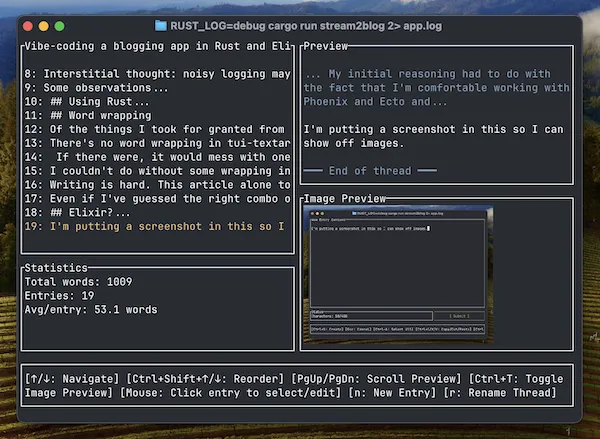
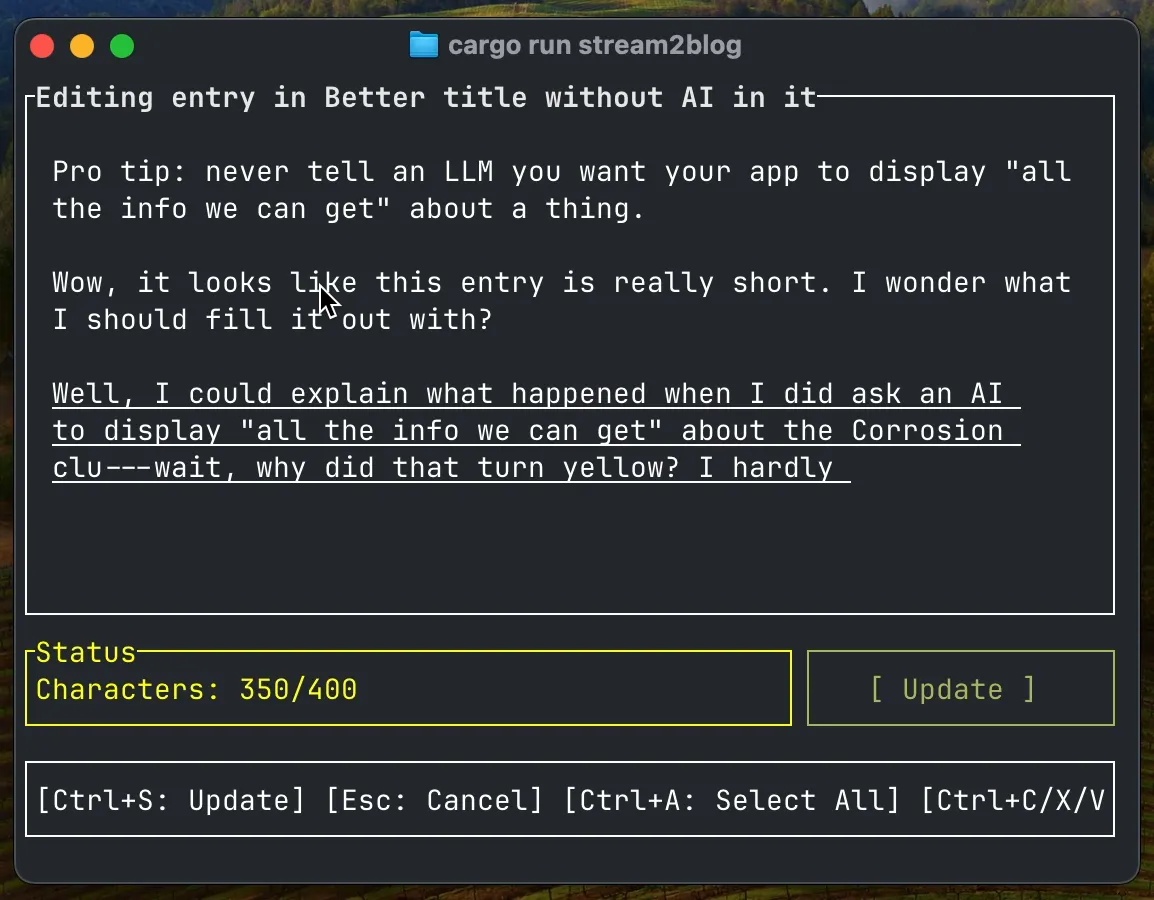
    <content type="html"><![CDATA[<p> <img src="/images/2025-07-31-screenie.webp" alt="Stream2blog TUI in thread view mode, showing numbered snippets and total word count on the left, a text preview and image thumbnail on the right, and shortcut key help at the bottom."> </p> <p> Writing is hard. I usually overthink it.</p> <p> Late one night, after mindlessly feeding the highlights of a day hike into a Slack thread, I had a punch-drunk inspiration: writing under similar constraints and conveniences, could I barf out a blog post almost as easily?</p> <p> Rather than compose my next article in Slack DMs with myself, I went for the second-most-practical proof of principle: creating a new tiny writing app that emulates the microblogging experience.</p> <p> I already had a gaggle of unfinished projects. But I was feeling good about Claude Code, and easily sniped by what looked like a quick vibe-coding side quest. So off I went!</p> <aside class="sidenote "> <p> They’re honking expectantly and pecking at my shoelaces. </p> </aside> <h2> Initial spec</h2> <p> I had a pretty clear set of basic requirements, as a user:</p> <ul> <li> A basic editor for composing short entries. Entries should drop into a “thread” that I can spit out into a single Markdown file when I’m ready to call it a draft. </li> <li> A hard character limit per entry, complete with colour-changing character counter to ratchet up anxiety in inverse proportion to conciseness. </li> <li> Some stupid-simple way to add a single image to an entry. Ideally: paste from the OS clipboard. With LLM help, it’ll be easy to add resizing and conversion to WebP, or whatever makes it easier to get from train-of-thought to published on my blog. </li> </ul> <h2> Scheming</h2> <p> For a break from the browser, and to satisfy my craving for novelty, I decided on a text-based user interface (TUI).</p> <p> A quick web search turned up strong TUI libraries for Go, Python, and Rust (<a href="https://github.com/charmbracelet/bubbletea">Bubble Tea</a>, <a href="https://textual.textualize.io/">Textual</a>, and <a href="https://docs.rs/ratatui/latest/ratatui/index.html">Ratatui</a>, for respective example). </p> <p> The novelty factor tipped the balance to Rust. Bonus: that means this can be a Rust client and Elixir/Phoenix storage API backed by SQLite, a <a href="https://www.dc.com/characters/bizarro">Bizarro</a> twin for the Phoenix-app-with-state-in-a-Rust-program that I bumped to the back burner to work on this.</p> <aside class="sidenote rowspan-4 "> <p> This isn’t precisely pants-on-head preposterous. </p> <p> My Elixir/Phoenix blog stores content in SQLite; putting storage on the Elixir side of an API boundary lets me eject from Rust if I want.</p> <p> I can run multiple instances of the Rust program, because the Elixir app owns the db. Well, I bet it’s like 90% safe, anyway.</p> </aside> <p> For the record: Claude assured me that this was a brilliant design. </p> <h2> Fast-forward</h2> <p> I started by working out, with Claude, design docs for the TUI and the Elixir storage app. </p> <p> From there I tried to let Claude generate the code, with appropriate interactive planning and feedback. Vibing was particularly easy at first when there was nothing but a green field, Claude Code, and a language I couldn’t so much as read a function signature in.</p> <p> I don’t have anything new to say about the process. Any specific observations will be stale by…well, by now, probably. So let’s skip forward.</p> <aside class="sidenote rowspan-2 "> <p> I cheated and put a little grab-bag in the appendix at the bottom.</p> </aside> <h2> So, it worked</h2> <p> A few days later, there was <a href="https://github.com/clutterstack/stream2blog">a working (if buggy) blogging application</a> that compromises very little on my original spec. It’s nice to use!</p> <aside class="sidenote rowspan-2 "> <p> Downside of making your own tools: there’s always the danger that I’ll feel the urge to fix minor flaws when I should be writing. At this point the shortcomings are minor enough that GitHub issues are decent containment.</p> </aside> <p> <img src="/images/2025-07-31-yellow.webp" alt="Stream2blog TUI with 350 characters of text in the editor and a yellow character counter showing 350/400"> </p> <p> <a href="https://ratatui.rs/">Ratatui</a>, <a href="https://crates.io/crates/tui-textarea">tui-textarea</a>, <a href="https://crates.io/crates/ratatui-image">Ratatui-image</a>, <a href="https://crates.io/crates/arboard">Arboard</a>, and <a href="https://crates.io/crates/textwrap">Textwrap</a> do most of the lifting. </p> <p> The main twist was that tui-textarea doesn’t do word wrap, and it was easier to fork it to use the Textwrap library than to do text wrapping on top of it. I’ll put up some notes on that part later.</p> <h2> After the vibes fade away</h2> <p> Was “vibe coding” a smart way to go about this?</p> <aside class="sidenote rowspan-5 "> <p> A Karpathy tweet (not that one): </p> <blockquote> <p> I inherited “AI assisted coding” from this @simonw post: <a href="https://simonwillison.net/2025/Mar/19/vibe-coding/">https://simonwillison.net/2025/Mar/19/vibe-coding/</a> </p> <p> But I think it needs work. It doesn’t roll off the tongue. </p> <p> Few days ago a friend asked me if I was vibe coding and I said no I’m “real coding”. Possible candidate :D </p> </blockquote> <p> – <a href="https://x.com/karpathy/status/1915586183834587218">https://x.com/karpathy/status/1915586183834587218</a></p> </aside> <p> (Trick question.)</p> <p> Smart? No. The land of Rust and Ratatui has a really good map! Ratatui and friends are well documented, with abundant examples to crib from. But I’m a tourist, and Claude can’t think about the whole map at once.</p> <p> If I wanted to do this effectively, and I really wanted to use Rust, I should have used the map myself, and let LLMs accelerate my learning.</p> <p> But what did I really want? </p> <p> I wanted the app. I wanted to touch Rust (but not too much).</p> <p> And…I wanted to see what Claude could do. I wanted to <a href="https://www.zachdaniel.dev/i/165721789/dont-test-the-machine">test the machine</a>. Which was particularly easy when there was nothing but a green field, Claude Code, and a language I couldn’t so much as read a function signature in.</p> <aside class="sidenote rowspan-5 "> <p> From Zach Daniel’s <a href="https://www.zachdaniel.dev/p/my-llm-workflow-and-tools-june-06">My LLM workflow &amp; tools | June 06, 2025</a>. To be clear, his message was “<em>don’t</em> test the machine”.</p> <p> Daniel is out there dealing lucidly and <a href="https://www.zachdaniel.dev/p/usage-rules-leveling-the-playing">proactively</a> with the <a href="https://www.zachdaniel.dev/p/llms-and-elixir-windfall-or-deathblow">predicament</a> we find ourselves in, while I’m nerd-sniping and trolling myself in my sandbox.</p> </aside> <p> I really did get the best one could hope for:</p> <ul> <li> A usable app, without understanding everything that was going into it </li> <li> A candy-coated dose of Rust </li> <li> An imaginary trophy for me and Claude and all the libraries I used. We did it, yay. </li> </ul> <p> Here’s a side effect: now there’s this neat progam full of bugs and antipatterns that I have only the merest inkling about, and I couldn’t in good conscience suggest anyone use it or fork it.</p> <p> Worse, I forked one of my dependencies to overcome the <a href="https://github.com/rhysd/tui-textarea/issues/5">longest-standing GitHub issue</a> on that project, and haven’t got anything good to offer back upstream. Who knows what nonsense is in there, and which other features I broke? Not me.</p> <h2> What about the Elixir backing app?</h2> <p> Looks like I vibed that one for real. Claude is so comfy with Phoenix and Ecto that I’ve hardly had to look at the storage app. No human brain cell has been bothered about a SQLite schema here. </p> <h2> But can you barf out a blog post now?</h2> <p> Of course not. Writing is hard. This article alone took days of vibe coding.</p> <p> Are my constraints and conveniences good for anything? So far, I’m encouraged. I used the new app to bootstrap this post. It helps me keep track of the shape of a thread without showing it all to me at once. I <em>can</em> start new entries to add words, but the per-entry character limit actively reminds me to encapsulate my point.</p> <p> It can still be tempting to organise a single thread into sections and move entries between them, which is a danger sign.</p> <p> The convenience of pasting images is gratifying, but I haven’t really had occasion to put it through its paces, and there’s still a bug or two around removing them. I still think it’ll be cool.</p> <p> If I use this to write another post after this one, I’ll say I was on to something.</p> <h2> Appendix: A smattering of Summer 2025 souvenirs (coding-with-LLMs-wise)</h2> <p> I’d now trust Claude.ai or Claude Code to <a href="https://clutterstack.com/posts/2025-03-12-claude-scarily-good-faking-deterministic-output">generate a one-off API client</a> in a language I can read (thus test and debug), without the buffer of getting it to write a program to do the conversion. </p> <p> What I wasn’t appreciating in March of this year is that these interfaces are not simple wrappers for an LLM—while I’m not sure if Claude.ai was unequivocally agentic at that point, it is now.</p> <aside class="sidenote "> <p> That being said: we can’t trust Claude Code and Claude Sonnet 4.0, in July 2025, to infer that if all existing database operations happen using API calls, the app should probably not start writing directly to the db file.</p> </aside> <p> Miscellany:</p> <ul> <li> <p> Lazy cheat code: ask “why.” When debugging, Claude sometimes gets fixated on the first possibility it sees from wherever its attention is, and goes ahead with useless changes. When Claude seems to be having a bad day, asking it to explain why the program is behaving like that, before asking it to solve anything, can help keep it out of that rut. I haven’t added this to my CLAUDE.md yet, but I probably should. </p> </li> <li> <p> Alternate lazy cheat for bad days: ask “how does the module handle <code class="inline">$WHATEVER</code>“ when you know it’s doing <code class="inline">$WHATEVER</code> wrong, and sometimes it’ll figure it out without you having to complain about symptoms. </p> </li> <li> <p> Claude likes to add diagnostic logs. I’m glad it doesn’t spontaneously remove logging, I guess, but I wonder if noisy logging makes a material difference to token usage or can pollute the context meaningfully. So I try to keep those from getting too wild. Similar for compilation warnings, which I otherwise have a tendency to let build up. </p> </li> </ul>]]></content>
  </entry>
  <entry>
    <id>https://clutterstack.com/posts/2025-06-01-liveview-machine-affinity</id>
    <title>Machine Affinity with LiveView and fly-replay</title>
    <updated>2025-06-01T00:00:00.000Z</updated>
    <link rel="alternate" href="https://clutterstack.com/posts/2025-06-01-liveview-machine-affinity"/>
    <content type="html"><![CDATA[<p> I’ve been building an application to exercise some features of Phoenix/LiveView and Fly Machines. It’s <a href="https://where.fly.dev">a button</a>.</p> <p> You push the button. It makes an API call. A new virtual machine pops up on some Fly.io metal in the data centre nearest to you.</p> <aside class="sidenote rowspan-2 "> <p> Nearest, that is, to the Fly.io edge server you hit using the app’s Anycast IP address. If your ISP and its BGP friends are having a bad day, your request could take the scenic route.</p> </aside> <p> Once the new VM is up, the LiveView redirects your browser to it. Your very own Fly Machine serves you some content, then shuts itself down and gets destroyed forever.</p> <p> The whole schtick collapses if I don’t ensure any button-pusher can interact only with the Machine they launched. </p> <p> This looks like a type of session affinity, or sticky sessions, problem.</p> <h2> The key to sticky sessions within a Fly <code class="inline">app</code> is <code class="inline">fly-replay</code></h2> <p> Backing up: the Fly.io load balancer is a Rust program called fly-proxy. When you visit an app’s public URL, fly-proxy relays your request from the edge to a Machine with a service <a href="https://fly.io/docs/machines/api/machines-resource/#machine-config-object-properties">configured</a> on the right port and the concurrency headroom to fulfil it. In the simplest case, that’s the closest such Machine in the app. Machine state and autostart config also factor in, when they’re relevant. </p> <aside class="sidenote rowspan-1 "> <p> If you’re curious about the kind of distributed-state wrangling fly-proxy has to do to accomplish all that, there’s a peek in the intro paragraphs of <a href="https://fly.io/blog/parking-lot-ffffffffffffffff/">this 2025 Rust debugging episode on the Fly.io blog</a>.</p> </aside> <p> There’s no way to tell fly-proxy beforehand that it should deliver an HTTP request to Machine B with a service exposed on port 80, and not the nearer Machine A in the same app with a service on port 80. But it does provide for application code to examine the request and respond with a <a href="https://fly.io/docs/networking/dynamic-request-routing/"><code class="inline">fly-replay</code></a> header, telling it to deliver the request again; to a different app, to a specific region, or to not-this-Machine, and fly-proxy applies its load-balancing logic within those constraints. Or we can pin the replay down to a specific Machine.</p> <aside class="sidenote rowspan-2 "> <p> If we have control of the client, we can skip the bounce with a <code class="inline">fly-force-instance-id</code> or <code class="inline">fly-prefer-region</code> header, but visitors’ browsers rightly don’t let our websites add arbitrary headers to their outgoing requests.</p> <p> There’s classic reading on fly-proxy and <code class="inline">fly-replay</code> inside <a href="https://fly.io/blog/globally-distributed-postgres/#the-fly-replay-header"><em>Globally Distributed Postgres</em> (2021)</a>.</p> </aside> <p> This makes the proxy sort-of programmable without actually making it programmable.</p> <h2> An app per customer may be better than <code class="inline">fly-replay</code></h2> <p> If the Closest Machine is frequently the Wrong Machine, and you’re constantly replaying requests, it may be worth putting each distinct Machine into its own Fly <code class="inline">app</code> with its own <code class="inline">.fly.dev</code> URL. </p> <p> If you’re isolating workloads/users on their own VMs for security reasons, putting them into their own apps too is even better, because you can wall apps off into separate <a href="https://fly.io/docs/networking/custom-private-networks/">custom IPv6 private networks</a>.</p> <p> In my case, though, <code class="inline">fly-replay</code> is just the ticket. fly-proxy has a high chance of hitting the correct Machine on the first try. The whole visitor experience is short and I don’t want to bog it down with more API operations and waiting for DNS. (And while I could generate disposable app names with a vanishing likelihood of collision, burning globally unique app names just feels stinky.)</p> <p> So from here I just have to implement the logic in my LiveView app to issue a <code class="inline">fly-replay</code> for every request that needs one. It’s not quite straightforward.</p> <h2> Peter Ullrich solved this exact thing already</h2> <p> As it happens, Peter Ullrich <a href="https://peterullrich.com/request-routing-and-sticky-sessions-in-phoenix-on-fly">wrote an article</a> on using <code class="inline">fly-replay</code> for sticky sessions on Fly.io with a Phoenix/LiveView application. It’s pretty neat, and he explains both the why and the how; I’ll recap what stood out to me, but you should read his version for the good stuff.</p> <p> Ullrich wrote a <a href="https://hexdocs.pm/plug/Plug.html#module-module-plugs">module plug</a> that checks each incoming request for a query parameter, or failing that, a cookie, matching the ID of the current Machine. If the query parameter matches, it puts that into a session cookie so that it’s passed in with all subsequent requests from that client (until that cookie gets changed). If there’s a parameter or a cookie, but it doesn’t match, the plug responds with a <code class="inline">fly-replay</code> header and a redirect status (307). </p> <aside class="sidenote "> <p> This 307 code is basically a placeholder. fly-proxy doesn’t care what status code or body you put on the response, and it doesn’t pass responses containing <code class="inline">fly-replay</code> back out to the client.</p> </aside> <p> The tricky part in a LiveView application is getting every request to go through that plug. WebSocket connection requests don’t go through the router, nor through the regular plugs in the endpoint, so just adding a plug in either of those modules doesn’t cut it.</p> <p> To ensure everything, <em>everything</em>, goes through a particular plug, you can override the definition of the endpoint’s <code class="inline">Plug.call/2</code> callback to run through that plug first. </p> <p> The plug either issues a <code class="inline">fly-replay</code> or dumps the <code class="inline">conn</code> into the front end of the stock endpoint to be handled in the usual way.</p> <p> Again, I didn’t figure this out myself; go read the <a href="https://peterullrich.com/request-routing-and-sticky-sessions-in-phoenix-on-fly">original post</a>.</p> <h2> I tried to squirm out of it</h2> <p> When I first read Ullrich’s article, I refused to believe that my use case wasn’t simpler.</p> <p> I thought I should be able to start with something like a vanilla LiveView authentication/authorization setup and simplify that down to some path-based logic with a <a href="https://hexdocs.pm/phoenix_live_view/security-model.html#live_session"><code class="inline">live_session</code></a> and an <code class="inline">on_mount</code> hook to gate access to the LiveView and <code class="inline">fly-replay</code> any requests for a path indicating a different Machine.</p> <p> This almost worked!</p> <p> Just kidding; of course it didn’t.</p> <p> An <code class="inline">on_mount</code> hook can’t manipulate connections the way a plug can, and it can’t send a <code class="inline">fly-replay</code> header. It can do a redirect to a route in the router module, though. </p> <p> For a moment I thought it would be clever to get the <code class="inline">on_mount</code> callback to check the path against the <code class="inline">FLY_MACHINE_ID</code> environment variable (this part is fine) and if needed, cycle the connection back to the router and through a plug, which <em>can</em> set headers and respond. </p> <p> If it’s not obvious, what this accomplishes, when you hit the wrong Machine, is an infinite loop of <code class="inline">fly-replay</code> “redirects”. </p> <p> Getting a LiveView rendered and connected involves two requests, running its <code class="inline">mount</code> function twice. The first <code class="inline">on_mount</code> catches a request meant for another Machine, and replays to that Machine. But the WebSocket upgrade needs one more HTTP request.</p> <aside class="sidenote "> <p> I like <a href="https://kobrakai.de/kolumne/liveview-double-mount">Benjamin Milde’s article about the LiveView double mount</a>.</p> </aside> <p> If fly-proxy thought the wrong Machine was a good choice the first time, it probably thinks the same thing this time too, and sends the upgrade request there, where the <code class="inline">on_mount</code> callback sends it back to the router on the right Machine, where we start all over again.</p> <h2> Tweaks</h2> <p> I used Ullrich’s solution wholesale, with two adjustments to the plug:</p> <ul> <li> I added a condition to let requests to <code class="inline">/health</code> pass; localhost needs to reach it. A plug in the router pipeline blocks non-localhost connections. </li> <li> Instead of passing all connections that don’t match one of the conditions, I block them. There’s no resource that you should be looking for on this Machine if it’s not the Machine you created. </li> </ul> <p> My adaptation is in <a href="https://gist.github.com/clutterstack/97a66b4b7d7d82babf586962e80ade95">this gist</a>.</p> <p> Push the button at <a href="https://where.fly.dev">https://where.fly.dev</a>. See if it works for you.</p>]]></content>
  </entry>
  <entry>
    <id>https://clutterstack.com/posts/2025-03-12-claude-scarily-good-faking-deterministic-output</id>
    <title>Claude got scarily good at faking deterministic output</title>
    <updated>2025-03-12T00:00:00.000Z</updated>
    <link rel="alternate" href="https://clutterstack.com/posts/2025-03-12-claude-scarily-good-faking-deterministic-output"/>
    <content type="html"><![CDATA[<p> The other day, I accidentally got Claude 3.7 Sonnet to generate a thousand-line, <a href="https://hexdocs.pm/req/">Req</a>-based Elixir API client from the <a href="https://docs.machines.dev/">OpenAPI spec for Fly Machines</a>.</p> <p> I was exploring the options for structuring such a module, more out of curiosity than any urgent need, and asked Claude on a whim if it could produce functions for all the endpoints. It did. Forty-odd functions, complete with typespecs and detailed docstrings. It hit its message-length limit and I had to ask it to carry on in a new message. It picked up and finished without incident. </p> <aside class="sidenote rowspan-2 "> <p> I have had zero previous success getting a complete response with the “continue” option in Claude chat. Admittedly it’s got to be trickier when the too-long message has interdependent functions that it has to reconcile.</p> </aside> <p> The output looks solid. It looks consistent. Claude doesn’t seem to have so much as supplemented the request parameters with a popular one from some other API.</p> <p> I was really impressed that Claude sustained such an uncanny impersonation of a dumb but reliable Python script for that long—despite the Vaudeville hook dragging it offstage partway through the act.</p> <aside class="sidenote rowspan-1 "> <p> Or <a href="https://github.com/OpenAPITools/openapi-generator/">Java program</a>.</p> </aside> <p> Also: this is terrible. Now I can sneeze and a nondeterministic black box barfs out a thousand lines of independent functions and docs oozing respectability and discipline? I’m going to be so tempted to trust this!</p> <p> If I’d planned an exhaustive client for this API, I’d have asked my machine buddy for help writing a boring Python script (or Mix task) to convert the OpenAPI spec directly, reproducibly, and with a lot less electricity.</p> <aside class="sidenote rowspan-1 "> <p> <a href="/posts/2024-10-24-llm-observations">Which is what I did</a> when I wanted <a href="https://hexdocs.pm/ecto/embedded-schemas.html">Ecto embedded schemas</a> to validate parameters going out in request bodies.</p> </aside> <p> I should note that the docstrings I ended up with are richer than what’s in the spec. Some of the example material identifiably originated in <a href="https://fly.io/docs/machines/api/">Fly.io developer docs</a>. So, there’s that.</p> <h2> Now that I have all that code</h2> <p> This may be the first time an LLM tool has bitten off more than <em>I</em> can chew without losing its own bearings. The vibes were practically telepathic.</p> <p> I don’t <em>approve</em> of using an LLM for tasks that need repeatability and can be done in seconds on a CPU. I can’t be sure there are no surprises until I’ve checked every function, and if I ask again, there’s no guarantee any deficiencies will be the same ones.</p> <p> But here’s the module, fully formed. What to do?</p> <p> I <em>do</em> want to talk to a subset of this API from my Elixir apps, and this gives me a starting point for incorporating the schema validation I’ve been playing with. </p> <p> I could “ship” it and fix it if I ever find out it’s broken—the stakes couldn’t be lower. But all those untried functions, all that unexamined documentation in my module—it was stressing me out.</p> <p> I took the easy way out: the reusable moving parts and a couple endpoint functions go into a module and the rest get banished into a slush file outside my project. I don’t have to look at them, but I can grab them as needed, if they ever are. Instant relief.</p> <aside class="sidenote rowspan-1 "> <p> The file’s called <code class="inline">jello.ex</code>. It’s tastier than slop and holds its shape better.</p> </aside> <h2> More things I think about LLMs, March 2025 edition</h2> <p> As always, the quality of the output of an LLM chat tool is entangled with the quality of my side of the conversation. It’s all moving targets and YMMV.</p> <ul> <li> The Elixir ecosystem abounds with high-signal, well-structured documentation. Claude’s grounding in Elixir has improved immensely in the past year. In my opinion, between the two we’ve hit a tipping point for a coding-while-learning momentum boost. </li> <li> Once the shiny, clean module appeared, I immediately got Claude to start messing it up by asking it a question about Req options. I think questions like “do I have to do X in order for Y to happen?” can be leading if there’s a weakness around Y in the model or the context. Claude is a bit too much of a people pleaser, and my lightweight attempts to counter that with project instructions and preferences haven’t cured that. </li> <li> It has happened, though, with both Claude and ChatGPT, that I’ve proposed one thing and the tool has correctly advised me to use a different approach. </li> <li> I do still wade into boggy ground with Claude 3.7, ask it to bite off more than it can chew and end up in a cycle of ineffectual “corrections”, or ask it something it doesn’t have a good grounding in and end up trying to find docs for nonexistent functions to help me implement some antipattern. </li> <li> At the end of February, I was surprised when Claude <em>3.5</em> Sonnet and I managed a very similar failure of attention navigating a bureaucracy of pattern-matching function heads. We both missed that the salient clause returned a value instead of handing it off to the next one in line. For all I know, this wouldn’t happen with 3.7. Claude can be so ultra-agreeable that I almost think I planted that blind spot by telling it what I couldn’t find. </li> </ul>]]></content>
  </entry>
  <entry>
    <id>https://clutterstack.com/posts/2025-02-27-iex-S-mix-phx-server</id>
    <title>iex -S mix phx.server: What? How?</title>
    <updated>2025-02-27T00:00:00.000Z</updated>
    <link rel="alternate" href="https://clutterstack.com/posts/2025-02-27-iex-S-mix-phx-server"/>
    <content type="html"><![CDATA[<p> <code class="inline">iex -S mix phx.server</code>: it starts up my Phoenix dev server under Elixir’s interactive shell program, <a href="https://hexdocs.pm/iex/IEx.html">IEx</a>, so I can call functions from my app and <a href="/posts/2025-01-30-observer-elixir">whatnot</a>.</p> <p> One day, it started to bug me <em>unreasonably</em> much that I didn’t really understand how this command causes that to happen. Perhaps culpable: a touch of delirium, downstream of the flu.</p> <p> There were a lot of reasons for my mystification (i.e. a lot of basic things I hadn’t thought much about before), so below you’ll find, if you want to, ~2700 words about some things that happen and how. I don’t expect even one whole person to read the entirety. It’s not that kind of blog post.</p> <p> There may be inaccuracies.</p> <h2> Interacting scripts</h2> <p> Before getting fancy, I want to know what my basic everyday Elixir commands do.</p> <p> The <a href="https://github.com/elixir-lang/elixir/blob/v1.18/bin/elixir"><code class="inline">elixir</code></a>, <a href="https://github.com/elixir-lang/elixir/blob/v1.18/bin/iex"><code class="inline">iex</code></a>, and <a href="https://github.com/elixir-lang/elixir/blob/v1.18/bin/mix"><code class="inline">mix</code></a> commands are all scripts.</p> <aside class="sidenote rowspan-2 "> <p> I’m looking at the Unixy versions, but there are Windows <code class="inline">.bat</code> files too.</p> </aside> <h3> <code class="inline">elixir</code>, the script</h3> <p> <a href="https://github.com/elixir-lang/elixir/blob/v1.18/bin/elixir">The <code class="inline">elixir</code> shell script</a> constructs a string of arguments based on the arguments you supply, plus some information about your Elixir installation, and tacks that onto an <code class="inline">erl</code> command.</p> <aside class="sidenote rowspan-1 "> <p> The text for <code class="inline">elixir --help</code> comes from this file, too.</p> </aside> <div class="callout"> <h3> </h3> <p> <a href="https://www.erlang.org/doc/apps/erts/erl_cmd.html"><code class="inline">erl</code></a> comes with the Erlang distribution. It bootstraps an Erlang runtime environment, including starting a BEAM instance for everything to run on, and gets it to do the things indicated by the arguments. Unless you tell it not to, <code class="inline">erl</code> also supplies, and drops you into, the Erlang interactive shell.</p> </div> <aside class="sidenote "> <p> BEAM <a href="https://www.erlang.org/blog/beam-compiler-history/#beam-bogdans-erlang-abstract-machine">(Bogdan’s Erlang Abstract Machine)</a>: “the virtual machine that executes user code in the Erlang Runtime System (ERTS)” (John Högberg, <a href="https://www.erlang.org/blog/a-brief-beam-primer/"><em>A brief introduction to BEAM</em></a>)</p> </aside> <p> The <code class="inline">elixir</code> script ends with</p> <pre><code>if [ -n &quot;$ELIXIR_CLI_DRY_RUN&quot; ]; then echo &quot;$@&quot; else exec &quot;$@&quot; fi</code></pre> <p> It’s assembled the <code class="inline">erl</code> invocation, with all its arguments, into <code class="inline">&quot;$@&quot;</code>, and all that’s left is to execute that command. </p> <p> But look! By setting the <code class="inline">ELIXIR_CLI_DRY_RUN</code> env var, you can view the whole assembly instead of running it! I didn’t know that; I’m going to use it in a minute.</p> <h3> <code class="inline">mix</code>, the script</h3> <p> <a href="https://github.com/elixir-lang/elixir/blob/v1.18/bin/mix">The <code class="inline">mix</code> script</a> is exactly this:</p> <pre><code>#!/usr/bin/env elixir Mix.CLI.main()</code></pre> <aside class="sidenote rowspan-2 "> <p> <code class="inline">mix</code> help text comes from the <a href="https://github.com/elixir-lang/elixir/blob/v1.18/lib/mix/lib/mix/cli.ex#L229"><code class="inline">display_usage/0</code></a> private function in <code class="inline">Mix.CLI</code>.</p> </aside> <p> This is an Elixir script! The shebang makes <code class="inline">mix</code> a (much) shorter way to write (in my case, with runtime installations managed by <a href="https://asdf-vm.com/">asdf</a>):</p> <pre><code class="sh">elixir /Users/chris/.asdf/installs/elixir/1.17.3-otp-27/bin/mix</code></pre> <p> So <code class="inline">mix</code> invokes <code class="inline">elixir</code> and we end up, again, with an <code class="inline">erl</code> command.</p> <p> This felt circular to me, because the <code class="inline">elixir</code> script doesn’t do anything with the contents of the <code class="inline">mix</code> script. But that’s just the way it works; rest assured that <em>something</em> eventually reads the file. We’ll see what, later.</p> <h3> <code class="inline">iex</code>, the script</h3> <p> <a href="https://github.com/elixir-lang/elixir/blob/v1.18/bin/iex">The <code class="inline">iex</code> shell script</a> ends with</p> <pre><code>exec &quot;$SCRIPT_PATH&quot;/elixir --no-halt --erl &quot;-user elixir&quot; +iex &quot;$@&quot;</code></pre> <p> Which is to say: it calls the <code class="inline">elixir</code> command with a specific set of arguments, followed by any arguments it was called with (<code class="inline">&quot;$@&quot;</code>). </p> <p> Another <code class="inline">erl</code> command.</p> <aside class="sidenote rowspan-2 "> <p> This explains why the help text for <code class="inline">iex</code>, for which this script happens to be the source, ends with this line: <code class="inline">It accepts all other options listed by &quot;elixir --help&quot;.</code> </p> <p> And it’s how we can use the <code class="inline">-S</code> flag with <code class="inline">iex</code>.</p> </aside> <p> <code class="inline">elixir --help</code> has entries for <code class="inline">--no-halt</code> (“[do] not halt the Erlang VM after execution”) and <code class="inline">--erl</code> (“[s]witches to be passed down to Erlang”). That <code class="inline">+iex</code> option isn’t in the help, but the <code class="inline">elixir</code> script does <a href="https://github.com/elixir-lang/elixir/blob/6ecb43061476c0870e24899a23ce8921835920d5/bin/elixir#L111">notice it</a>, and <a href="https://github.com/elixir-lang/elixir/blob/6ecb43061476c0870e24899a23ce8921835920d5/bin/elixir#L217">omit <code class="inline">-s elixir start_cli</code> from its <code class="inline">erl</code> arguments</a>. </p> <p> But we don’t have to work out the final set of arguments by reading the scripts. We can just print them out by setting the <code class="inline">ELIXIR_CLI_DRY_RUN</code> environment variable.</p> <h2> Pause to appreciate coolness</h2> <p> My Erlang/OTP installation doesn’t know anything about my Elixir installation.</p> <p> The arguments in these human-readable <code class="inline">erl</code> commands will have to tell it, or point it at, everything it needs to know in order to do whatever Elixir-land thing I wanted. This is not trivial or banal. It is very cool.</p> <h2> How to read <code class="inline">erl</code> arguments</h2> <p> So: <code class="inline">elixir</code> runs <code class="inline">erl</code> with a collection of arguments. And <code class="inline">iex</code> and <code class="inline">mix</code> both go through <code class="inline">elixir</code>. That is, each of these commands generates an <code class="inline">erl</code> command.</p> <aside class="sidenote "> <p> I neglected <a href="https://hexdocs.pm/elixir/modules-and-functions.html#compilation"><code class="inline">elixirc</code></a> but a quick check shows that <a href="https://github.com/elixir-lang/elixir/blob/v1.18/bin/elixirc">it, too, calls <code class="inline">elixir</code></a>.</p> </aside> <p> The <code class="inline">erl</code> docs do a pretty good job of <a href="https://www.erlang.org/doc/apps/erts/erl_cmd#erl-arguments">explaining the different kinds</a> of argument that <code class="inline">erl</code> accepts, and what it does with each kind.</p> <p> It can be a bit hairy to categorise them in practice. The following paraphrases info that’s in the docs, with some emphasis on “subtleties” that I missed in my first reading, and that would have saved me some casting about in source code.</p> <ul> <li> <p> <a href="https://www.erlang.org/doc/apps/erts/erl_cmd#emu_flags"><strong>Emulator flags</strong></a> are for VM settings. Emulator flags start with a plus sign, <a href="https://www.erlang.org/doc/apps/erts/erl_cmd#erl-arguments">except when they start with a hyphen like all the other flags</a>. We won’t run into any emulator flags in this exercise. </p> </li> <li> <p> Many, but not all, <a href="https://www.erlang.org/doc/apps/erts/erl_cmd.html#flags">other defined flags</a> are marked as <strong>init flags</strong>: flags that are interpreted and used by Erlang’s <code class="inline">init</code> and not stored for later use. </p> </li> <li> <p> <code class="inline">--</code> and <code class="inline">-extra</code> are init flags that indicate that what follows is one or more <strong>plain_arguments</strong>: values that the <code class="inline">init</code> stores in a list that you can get later with <a href="https://www.erlang.org/doc/apps/erts/init.html#get_plain_arguments/0"><code class="inline">init:get_plain_arguments/0</code></a>. </p> </li> <li> <p> You, the user, can create <strong>user flags</strong> to suit your needs. The <code class="inline">init</code> stores user flags as key-value pairs, where the flag becomes an atom key for a value that’s a list of the items that follow (up until the next flag). To get this list, use <a href="https://www.erlang.org/doc/apps/erts/init.html#get_arguments/0"><code class="inline">init:get_arguments/0</code></a>. If an argument starts with a hyphen, and it’s not an init flag, an emulator flag or a plain argument, it’s a user flag. </p> </li> <li> <p> Some code that comes with the Erlang distribution looks for arguments stored with specific user flags. Some of these user flags are <a href="https://www.erlang.org/doc/apps/erts/erl_cmd.html#flags">documented alongside the init flags</a>. </p> </li> <li> <p> Case in point: there’s an important special-case user flag <a href="https://www.erlang.org/doc/apps/erts/erl_cmd.html#flags">documented</a> as <code class="inline">-Application Par Val</code>; when/if the OTP application named <code class="inline">Application</code> is started, <code class="inline">Application</code>‘s <code class="inline">Par</code> configuration option is set to <code class="inline">Val</code>. We see this shape of user flag in the <code class="inline">elixir</code> command. This one tripped me up; I could see the apparent intent but missed it in the docs. </p> </li> </ul> <h2> <code class="inline">elixir</code>, <code class="inline">mix</code>, <code class="inline">iex</code>: the <code class="inline">erl</code> angle</h2> <p> Armed with the above clues to how <code class="inline">erl</code> statements work, let’s look at minimal examples of each of our Elixir commands.</p> <h3> <code class="inline">elixir</code></h3> <p> If I don’t put something after <code class="inline">elixir</code>, it just prints its help at me, so I’ll tell it to print <code class="inline">hi</code> instead.</p> <pre><code class="sh">ELIXIR_CLI_DRY_RUN=1 elixir -e &#39;IO.puts(&quot;hi&quot;)&#39;</code></pre> <p> Here’s what that spits out:</p> <pre><code class="sh">erl -noshell \ -elixir_root /Users/chris/.asdf/installs/elixir/1.17.3-otp-27/bin/../lib \ -pa /Users/chris/.asdf/installs/elixir/1.17.3-otp-27/bin/../lib/elixir/ebin \ -elixir ansi_enabled true \ -s elixir start_cli \ -extra -e IO.puts(&quot;hi&quot;)</code></pre> <p> That’s an eyeful, but it’s mostly because paths are long and messy. Flag by flag:</p> <dl> <dt> <p> <code class="inline">-noshell</code> </p> </dt> <dd> <p> Skips starting the Erlang shell. We want this init flag if we’re working in Elixir and not Erlang. Either we don’t want a shell, or we want IEx. </p> </dd> </dl> <dl> <dt> <p> <code class="inline">-elixir_root /Users/chris/.asdf/installs/elixir/1.17.3-otp-27/bin/../lib</code> </p> </dt> <dd> <p> <code class="inline">-elixir_root</code> is a user flag. We’re telling the <code class="inline">init</code> to store the path to our installed Elixir <code class="inline">lib</code> dir under the key <code class="inline">:elixir_root</code>. </p> <p> Spoiler: The <code class="inline">start/2</code> function of the <code class="inline">elixir</code> module <a href="https://github.com/elixir-lang/elixir/blob/v1.18/lib/elixir/src/elixir.erl#L40">uses</a> this stored value to set paths to <code class="inline">ebin</code> directories, where <code class="inline">.beam</code> files are. </p> </dd> </dl> <dl> <dt> <p> <code class="inline">-pa /Users/chris/.asdf/installs/elixir/1.17.3-otp-27/bin/../lib/elixir/ebin</code> </p> </dt> <dd> <p> <code class="inline">-pa</code> is an init flag. Adds the path to the Elixir <code class="inline">.beam</code> files to Erlang’s code path. </p> </dd> </dl> <dl> <dt> <p> <code class="inline">-elixir ansi_enabled true</code> </p> </dt> <dd> <p> This is that special <code class="inline">-&lt;application&gt; &lt;parameter&gt; &lt;value&gt;</code> user-flag format. Sets <code class="inline">:ansi_enabled</code> to <code class="inline">true</code> in the <code class="inline">:elixir</code> OTP application’s config when it starts. </p> </dd> </dl> <aside class="sidenote "> <p> As it happens, if I omit <code class="inline">-elixir ansi_enabled true</code>, it still shows up in the configuration for the <code class="inline">elixir</code> application. To convince myself that I can affect the config (and getting a little ahead of the plot), I can start up a BEAM instance just to configure and start Elixir, print the configuration, and shut down:</p> <pre><code class="sh">erl -noshell \ -elixir_root /Users/chris/.asdf/installs/elixir/1.17.3-otp-27/bin/../lib \ -pa /Users/chris/.asdf/installs/elixir/1.17.3-otp-27/bin/../lib/elixir/ebin \ -elixir cat_food kibble \ -s elixir start_cli \ -extra -e &quot;IO.inspect(Application.get_all_env(:elixir))&quot;</code></pre> <p> and find in the output</p> <pre><code class="sh">cat_food: :kibble, ansi_enabled: true</code></pre> </aside> <dl> <dt> <p> <code class="inline">-s elixir start_cli</code> </p> </dt> <dd> <p> <code class="inline">-s</code> is another init flag. Run function <a href="https://github.com/elixir-lang/elixir/blob/v1.18/lib/elixir/src/elixir.erl#L194"><code class="inline">start_cli/0</code></a> of the <a href="https://github.com/elixir-lang/elixir/blob/v1.18/lib/elixir/src/elixir.erl"><code class="inline">elixir</code> module</a>. </p> <p> This function starts the <code class="inline">elixir</code> OTP <a href="https://www.erlang.org/doc/apps/kernel/application">application</a> (and starts the <code class="inline">logger</code> application) and finally passes our list of stored plain arguments to <code class="inline">Elixir.Kernel.CLI.main/1</code>, <a href="https://github.com/elixir-lang/elixir/blob/v1.18/lib/elixir/lib/kernel/cli.ex#L23">“the API invoked by [the] Elixir boot process”</a> with this line: </p> <pre><code class="erlang"> &#39;Elixir.Kernel.CLI&#39;:main(init:get_plain_arguments()).</code></pre> <p> (Good thing we told Erlang where to find Elixir with the <code class="inline">-pa</code> flag.) </p> </dd> </dl> <dl> <dt> <p> <code class="inline">-extra -e IO.puts(&quot;hi&quot;)</code> </p> </dt> <dd> <p> Each thing after <code class="inline">-extra</code> in an <code class="inline">erl</code> expression is a plain argument, so <code class="inline">-e</code> and <code class="inline">&#39;IO.puts(&quot;hi&quot;)&#39;</code> are stored by the <code class="inline">init</code> as such. </p> <p> My <code class="inline">&#39;IO.puts(&quot;hi&quot;)&#39;</code> came out without its single quotes. I can roll with that; I had to type it in a way that would be parsed unambiguously in the shell, and now it’s in the shape it has to be in for the next thing to parse. </p> <p> On that topic, we can quickly check how the <code class="inline">init</code> stores plain arguments: </p> <pre><code class="sh">erl -extra -e &#39;IO.puts(&quot;hi&quot;)&#39; </code></pre> <pre><code>Erlang/OTP 27 [erts-15.2.1] [source] [64-bit] [smp:12:12] [ds:12:12:10] [async-threads:1] [jit] Eshell V15.2.1 (press Ctrl+G to abort, type help(). for help) 1&gt; init:get_plain_arguments(). [&quot;-e&quot;,&quot;IO.puts(\&quot;hi\&quot;)&quot;]</code></pre> <p> (Plain arguments keep their order in the list, which is important when it comes to parsing and using them.) </p> </dd> </dl> <p> Recapping what’s explicit in the <code class="inline">erl</code> expression: typing <code class="inline">elixir -e &#39;IO.puts(&quot;hi&quot;)&#39;</code> into my system shell starts an Erlang VM (BEAM) instance in which the Erlang <code class="inline">init</code> process:</p> <ul> <li> <em>doesn’t</em> start an Erlang shell </li> <li> prepares the Erlang runtime environment, including: <ul> <li> setting the path to Elixir <code class="inline">.beam</code> files </li> <li> storing some <code class="inline">arguments</code>, which in this case are for setting up the <code class="inline">elixir</code> OTP application </li> <li> storing some <code class="inline">plain_arguments</code> that correspond to the arguments I passed to the <code class="inline">elixir</code> command </li> </ul> </li> <li> invokes the <a href="https://github.com/elixir-lang/elixir/blob/v1.18/lib/elixir/src/elixir.erl#L194"><code class="inline">start_cli/0</code></a> function of the <code class="inline">elixir</code> module </li> </ul> <p> That’s the end of what we can read on the face of the <code class="inline">erl</code> expression.</p> <p> Then, <code class="inline">elixir:start_cli/0</code> configures and starts the <code class="inline">elixir</code> and <code class="inline">logger</code> OTP applications, yoinks the list of plain arguments from the Erlang <code class="inline">init</code>, and passes that to our first Elixir function, <a href="https://github.com/elixir-lang/elixir/blob/661319329e667f18158001441ee2ec43a537998e/lib/elixir/lib/kernel/cli.ex#L25"><code class="inline">Elixir.Kernel.CLI.main/1</code></a>. </p> <p> So I want to know what Elixir does with these arguments.</p> <div class="callout"> <h3> </h3> <h4> What Elixir does with the plain arguments</h4> <p> <a href="https://github.com/elixir-lang/elixir/blob/661319329e667f18158001441ee2ec43a537998e/lib/elixir/lib/kernel/cli.ex#L25"><code class="inline">Elixir.Kernel.CLI.main/1</code></a> starts out with a <a href="https://github.com/elixir-lang/elixir/blob/661319329e667f18158001441ee2ec43a537998e/lib/elixir/lib/kernel/cli.ex#L6">map of default config options</a> for its own internal use and the incoming <code class="inline">argv</code> list provided by <a href="https://github.com/elixir-lang/elixir/blob/v1.18/lib/elixir/src/elixir.erl#L194"><code class="inline">elixir:start_cli/0</code></a>, and surfs <code class="inline">parse_argv/2</code> clauses, knocking arguments out of <code class="inline">argv</code> and modifying its <code class="inline">config</code> map as they match.</p> <p> The arguments must include something to run, or there’s no point to any of this. An argument preceded by a flag like <a href="https://github.com/elixir-lang/elixir/blob/69990a5d1d3cd00ed0422a87b49841c27e16ff15/lib/elixir/lib/kernel/cli.ex#L233"><code class="inline">&quot;-S&quot;</code></a> or <a href="https://github.com/elixir-lang/elixir/blob/v1.18/lib/elixir/lib/kernel/cli.ex#L272"><code class="inline">&quot;-e&quot;</code></a>, or an argument that <a href="https://github.com/elixir-lang/elixir/blob/69990a5d1d3cd00ed0422a87b49841c27e16ff15/lib/elixir/lib/kernel/cli.ex#L381">hasn’t been otherwise recognised, and so is assumed to indicate a file</a>, is identified as a thing to run, and populates the <code class="inline">commands</code> list in the <code class="inline">config</code> map.</p> <p> What remains in <code class="inline">argv</code> once the <code class="inline">parse_argv</code> gauntlet is run <a href="https://github.com/elixir-lang/elixir/blob/v1.18/lib/elixir/lib/kernel/cli.ex#L27">replaces</a> the <a href="https://hexdocs.pm/elixir/System.html"><code class="inline">System</code> “command line arguments” list</a> for whatever runs next, and <code class="inline">Kernel.CLI.main/1</code> turns its attention to executing its list of <code class="inline">commands</code>.</p> </div> <p> So <em>that’s</em> what <a href="https://github.com/elixir-lang/elixir/blob/v1.18/lib/elixir/lib/kernel/cli.ex#L23">“the API invoked by [the] Elixir boot process”</a> meant. The options you pass to the <code class="inline">elixir</code> CLI command, telling it what you want “Elixir” to do, go to the <code class="inline">Kernel.CLI</code> Elixir module, which makes it happen.</p> <p> My request to <code class="inline">e</code>valuate the Elixir syntax <code class="inline">IO.puts(&quot;hi&quot;)</code> is executed. The VM prints <code class="inline">hi</code> to stdout. I see it in my terminal. Elixir has done what I asked and halts the system.</p> <h3> <code class="inline">mix</code></h3> <pre><code class="sh">ELIXIR_CLI_DRY_RUN=1 mix </code></pre> <pre><code class="sh">erl -noshell \ -elixir_root /Users/chris/.asdf/installs/elixir/1.17.3-otp-27/bin/../lib \ -pa /Users/chris/.asdf/installs/elixir/1.17.3-otp-27/bin/../lib/elixir/ebin \ -elixir ansi_enabled true \ -s elixir start_cli \ -extra /Users/chris/.asdf/installs/elixir/1.17.3-otp-27/bin/mix</code></pre> <p> This is identical to the <code class="inline">elixir -e &#39;IO.puts(&quot;hi&quot;)&#39;</code> example, but with different plain arguments after the <code class="inline">-extra</code> flag.</p> <p> <code class="inline">Elixir.Kernel.CLI</code> will recognise the path to the <code class="inline">mix</code> script as the path to a file, read it, and call the function inside: <a href="https://github.com/elixir-lang/elixir/blob/v1.18/lib/mix/lib/mix/cli.ex"><code class="inline">Mix.CLI.main()</code></a>.</p> <div class="callout"> <h3> </h3> <h3> By the way: these <code class="inline">erl</code> commands aren’t for us</h3> <p> Running <code class="inline">erl</code> commands from the shell does an end run around the Elixir installation and the environment setup it takes care of. </p> <p> It just so happens that I got away with running the simple <code class="inline">elixir</code> example by its <code class="inline">erl</code> equivalent, but trying the same with <code class="inline">mix</code> leaves me missing <code class="inline">MIX_HOME</code> and <code class="inline">MIX_ARCHIVES</code> environment variables, the initial symptom being that Mix doesn’t know where to find <a href="https://hex.pm/">Hex</a>. </p> </div> <h3> <code class="inline">iex</code></h3> <pre><code class="sh">ELIXIR_CLI_DRY_RUN=1 iex </code></pre> <pre><code class="sh">erl -noshell \ -elixir_root /Users/chris/.asdf/installs/elixir/1.17.3-otp-27/bin/../lib \ -pa /Users/chris/.asdf/installs/elixir/1.17.3-otp-27/bin/../lib/elixir/ebin \ -elixir ansi_enabled true \ -user elixir \ -extra --no-halt +iex</code></pre> <p> In the not-IEx commands, <code class="inline">-s elixir start_cli</code> started Elixir, but the <code class="inline">-s</code> flag doesn’t show up here.</p> <dl> <dt> <p> <code class="inline">-user elixir</code> </p> </dt> <dd> <p> ELUSIVE. But important! <code class="inline">-user</code> is a user flag, and isn’t in the docs, but it’s a special one; the Erlang <code class="inline">user_sup</code> module <a href="https://github.com/erlang/otp/blob/maint-27/lib/kernel/src/user_sup.erl#L43">looks in the init arguments</a> for the key <code class="inline">user</code>. </p> <p> The <code class="inline">user</code> is the process that deals with the Erlang VM’s I/O; to interact with IEx, we need input and output to go through it. </p> <p> The best resource I’ve found for this Erlang <code class="inline">user</code> concept: <a href="https://ferd.ca/repl-a-bit-more-and-less-than-that.html"><em>REPL? A bit more (and less) than that</em></a> by Fred Hebert. (“If you want to change where the IO takes place, change the user process, and everything gets redirected.”) </p> <p> It looks like passing <code class="inline">-user elixir</code> means <a href="https://github.com/erlang/otp/blob/maint-27/lib/kernel/src/user_sup.erl#L102"><code class="inline">user_sup:start_user/3</code></a> calls <a href="https://www.erlang.org/doc/apps/erts/erlang#apply/3"><code class="inline">apply(elixir, start, [])</code></a>. </p> <p> In turn, <a href="https://github.com/elixir-lang/elixir/blob/v1.18/lib/elixir/src/elixir.erl#L182"><code class="inline">elixir:start/0</code></a> passes <a href="https://github.com/erlang/otp/blob/b6ab3a385ec72e346a44807d53e2109a51cde613/lib/kernel/src/user_drv.erl#L145"><code class="inline">user_drv:start/2</code></a> <a href="https://github.com/elixir-lang/elixir/blob/v1.18/lib/elixir/src/iex.erl#L48"><code class="inline">iex:shell/0</code></a> for its <code class="inline">initial_shell</code> argument and <code class="inline">iex:shell/0</code>, finally, calls <code class="inline">elixir:start_cli/0</code>, which feeds our plain arguments to <code class="inline">Kernel.CLI</code> to be acted on. </p> </dd> </dl> <aside class="sidenote rowspan-2 "> <p> The name of the <a href="https://hexdocs.pm/iex/IEx.html#module-the-user-switch-command">User switch command</a> now makes a lot more sense to me.</p> <p> Possibly <code class="inline">-user</code> isn’t documented among <a href="https://www.erlang.org/doc/apps/erts/erl_cmd.html#flags">defined <code class="inline">erl</code> flags</a> because to use it you’d have to implement your own <code class="inline">user</code>, which would put you beyond needing to look up the flag…?</p> <p> A notable commit (2012): <a href="https://github.com/elixir-lang/elixir/commit/678fafe7c13b5950c770ad16d77622a7d0ebc0f0">“Improve IEx by using the -user option (ht @yrashk)”</a></p> </aside> <dl> <dt> <p> <code class="inline">-extra --no-halt +iex</code> </p> </dt> <dd> <p> The plain arguments are <code class="inline">--no-halt</code> and <code class="inline">+iex</code>. </p> <p> We can find their significance in the Elixir <a href="https://github.com/elixir-lang/elixir/blob/661319329e667f18158001441ee2ec43a537998e/lib/elixir/lib/kernel/cli.ex"><code class="inline">Kernel.CLI</code> source</a>: </p> <ul> <li> <code class="inline">--no-halt</code> results in a <code class="inline">no_halt: true</code> entry in the <code class="inline">config</code> map, which results in the decision not to emit <code class="inline">System.halt(status)</code> after executing <code class="inline">commands</code>. </li> <li> <code class="inline">+iex</code> sets <code class="inline">mode: :iex</code> in <code class="inline">config</code>; this seems to be mainly used to decide how to deal with other flags like <code class="inline">-v</code> or <code class="inline">--version</code>, and <code class="inline">--dbg</code>. </li> </ul> </dd> </dl> <p> Differences from the <code class="inline">elixir</code> command: </p> <ul> <li> start the <code class="inline">iex</code> application after <code class="inline">elixir</code> </li> <li> send all VM I/O through <code class="inline">iex</code> </li> <li> don’t halt the system once <code class="inline">Kernel.CLI</code> has processed the plain arguments and taken any actions they ask for </li> </ul> <aside class="sidenote "> <p> The <code class="inline">elixir</code> application <a href="https://github.com/elixir-lang/elixir/tree/v1.18/lib/elixir/src">source</a> is written Erlang; <code class="inline">iex</code> <a href="https://github.com/elixir-lang/elixir/tree/v1.18/lib/iex/lib">source</a> is in Elixir.</p> </aside> <p> As we know, the end result is that I’m dropped into an IEx shell once all that’s done, and I can ask IEx to run moar Elixir.</p> <h2> What’s running in the VM?</h2> <p> Bare minimum, that is.</p> <p> Here are the started applications in my bare IEX shell.</p> <pre><code class="sh">iex -e &quot;IO.inspect(Application.started_applications)&quot;</code></pre> <pre><code class="sh">Erlang/OTP 27 [erts-15.2.1] [source] [64-bit] [smp:12:12] [ds:12:12:10] [async-threads:1] [jit] [ {:logger, ~c&quot;logger&quot;, ~c&quot;1.17.3&quot;}, {:iex, ~c&quot;iex&quot;, ~c&quot;1.17.3&quot;}, {:elixir, ~c&quot;elixir&quot;, ~c&quot;1.17.3&quot;}, {:compiler, ~c&quot;ERTS CXC 138 10&quot;, ~c&quot;8.5.4&quot;}, {:stdlib, ~c&quot;ERTS CXC 138 10&quot;, ~c&quot;6.2&quot;}, {:kernel, ~c&quot;ERTS CXC 138 10&quot;, ~c&quot;10.2.1&quot;} ] Interactive Elixir (1.17.3) - press Ctrl+C to exit (type h() ENTER for help) iex(1)&gt; </code></pre> <p> I haven’t run into the place that starts the <code class="inline">compiler</code> application, but I can wave my hands and say it makes sense that we’d need it; I might ask the VM to run something that hasn’t been compiled yet.</p> <p> I can compare the applications started in a VM that I spun up to run an Elixir function to list the applications started in it:</p> <pre><code class="sh">elixir -e &quot;IO.inspect(Application.started_applications)&quot;</code></pre> <pre><code class="sh">[ {:logger, ~c&quot;logger&quot;, ~c&quot;1.17.3&quot;}, {:elixir, ~c&quot;elixir&quot;, ~c&quot;1.17.3&quot;}, {:compiler, ~c&quot;ERTS CXC 138 10&quot;, ~c&quot;8.5.4&quot;}, {:stdlib, ~c&quot;ERTS CXC 138 10&quot;, ~c&quot;6.2&quot;}, {:kernel, ~c&quot;ERTS CXC 138 10&quot;, ~c&quot;10.2&quot;} ]</code></pre> <p> For fun, here’s one just for <code class="inline">erl</code>. Just <code class="inline">kernel</code> and <code class="inline">stdlib</code> in this VM:</p> <pre><code class="sh">erl -eval &#39;io:format(&quot;~p~n&quot;, [application:which_applications()]).&#39;</code></pre> <aside class="sidenote rowspan-2 "> <p> I totally got Claude (3.7 Sonnet, 27 Feb 2025) to write this snippet.</p> </aside> <pre><code class="sh">Erlang/OTP 27 [erts-15.2.1] [source] [64-bit] [smp:12:12] [ds:12:12:10] [async-threads:1] [jit] [{stdlib,&quot;ERTS CXC 138 10&quot;,&quot;6.2&quot;},{kernel,&quot;ERTS CXC 138 10&quot;,&quot;10.2.1&quot;}] Eshell V15.2.1 (press Ctrl+G to abort, type help(). for help) 1&gt; </code></pre> <h2> Putting the pieces together</h2> <p> When we start the BEAM with an <code class="inline">iex</code> command, all the VM’s I/O goes through IEx, and IEx implements the interactivity, including taking care of interpretation of Elixir expressions, or compilation of code, as necessary.</p> <p> All that’s left is to add <code class="inline">-S mix phx.server</code>:</p> <pre><code class="sh">ELIXIR_CLI_DRY_RUN=1 iex -S mix phx.server </code></pre> <pre><code class="sh">erl -noshell \ -elixir_root /Users/chris/.asdf/installs/elixir/1.17.3-otp-27/bin/../lib \ -pa /Users/chris/.asdf/installs/elixir/1.17.3-otp-27/bin/../lib/elixir/ebin \ -elixir ansi_enabled true \ -user elixir \ -extra --no-halt +iex -S mix phx.server</code></pre> <p> No surprises. Just like <code class="inline">iex</code>, but with an additional <code class="inline">-S mix phx.server</code> after <code class="inline">-extra</code>. </p> <p> Check on the plain arguments:</p> <pre><code class="sh">iex(1)&gt; :init.get_plain_arguments() [~c&quot;--no-halt&quot;, ~c&quot;+iex&quot;, ~c&quot;-S&quot;, ~c&quot;mix&quot;, ~c&quot;phx.server&quot;]</code></pre> <h3> How does Mix get its arguments?</h3> <p> We already talked about how the <code class="inline">[&quot;-S&quot;, &quot;mix&quot;]</code> part of the arguments list means <code class="inline">Elixir.Kernel.CLI</code> will execute the <code class="inline">mix</code> script. </p> <p> And we kinda know that Mix has to see the <code class="inline">&quot;phx.server&quot;</code> argument, since that’s the Mix Task we’re trying to run. Let’s just put a tidy bow on how that happens: </p> <p> As soon as <code class="inline">Kernel.CLI.parse_argv/2</code> matches <code class="inline">&quot;-S&quot;</code>, it stashes the next argument as a <code class="inline">:script</code> into its list of <code class="inline">commands</code> to run, and quits looking for things to parse. Everything that’s left in the original arguments list stays in the system command-line arguments list (<code class="inline">System.argv/0</code>). In this case, <code class="inline">&quot;phx.server&quot;</code> is what’s left.</p> <p> On the Mix side, the contents of the <code class="inline">mix</code> script calls <a href="https://github.com/elixir-lang/elixir/blob/v1.18/lib/mix/lib/mix/cli.ex"><code class="inline">Mix.CLI.main/1</code></a>, which defaults to getting its argument list from <code class="inline">System.argv/0</code>. Voilà: <code class="inline">Mix.CLI.main([&quot;phx.server&quot;])</code>.</p> <aside class="sidenote "> <p> I just checked and I can start this blog’s dev server from an IEx prompt by typing exactly that: <code class="inline">Mix.CLI.main([&quot;phx.server&quot;])</code></p> </aside> <p> An analogous thing happens, also via <code class="inline">Kernel.CLI</code>, if we run <code class="inline">mix phx.server</code>, or <code class="inline">elixir -S mix phx.server</code>.</p> <p> The first thing that <code class="inline">Mix.CLI.main/1</code> does is start the Mix application with <a href="https://github.com/elixir-lang/elixir/blob/69990a5d1d3cd00ed0422a87b49841c27e16ff15/lib/mix/lib/mix.ex#L426"><code class="inline">Mix.start/0</code></a>—but I could go on like this forever. Let’s just agree that Mix is now going to run the <code class="inline">phx.server</code> task.</p> <h2> Why is it shaped like this?</h2> <p> I now <em>truly believe</em> that <code class="inline">iex -S mix phx.server</code> starts my Phoenix dev server on a fresh Erlang VM and drops me into an Elixir shell in that VM.</p> <p> I’ve had the chance to admire the effort and ingenuity that goes into letting users run programs—no—<em>start up VMs and</em> run programs on them—with simple one-liners. </p> <p> I still go back and forth between “this is an obvious command that’s really explicit about what it does” and “something about this feels magical and weird.” That <code class="inline">-S</code> just sits kinda funny.</p> <p> If I were in the habit of using <code class="inline">elixir -S mix phx.server</code> to run the <code class="inline">phx.server</code> Mix task (which works): look, symmetry! <code class="inline">iex -S mix phx.server</code> is the same thing but through IEx!</p> <p> But I don’t do that, because <code class="inline">mix phx.server</code> works, thanks to <code class="inline">mix</code> being an Elixir script you can also invoke from a system shell. It all makes sense! Not so symmetric, though.</p> <p> In the end, it’s a balance between elegance and power. I see a lot more elegance in it than I did before.</p> <h2> Trivia: Some history of <code class="inline">iex -S mix</code></h2> <p> Early on, it seems there was some tension between the conciseness of <code class="inline">mix iex</code> (possible when <code class="inline">mix</code> is a plain shell script) and the flexibility of <code class="inline">iex -S mix</code> (possible when <code class="inline">mix</code> is an Elixir script); <code class="inline">bin/mix</code> went back and forth between shell script and Elixir script in 2012-2013: </p> <aside class="sidenote "> <p> Hat tip to <a href="https://elixirforum.com/t/where-to-find-info-about-iex-s-mix-command/48045/4"><code class="inline">@adamu</code> on the Elixir Forum</a>.</p> </aside> <ul> <li> 2012/07/16: <a href="https://github.com/elixir-lang/elixir/commit/a5a2025daf54f4a414ebcc1ba9949b7832b1b12d">“Add mix file executables”</a> (a shell script) </li> <li> 2012/07/31: <a href="https://github.com/elixir-lang/elixir/commit/05e52f9437d692c4fc8dc1b731574bbeeadc6fc6">“Make mix an Elixir script”</a> (an Elixir script) </li> <li> 2012/11/30: <a href="https://github.com/elixir-lang/elixir/commit/b3d203712a82fb02fc39016e42deba145825a856">“Fix mix iex”</a> (a shell script again) </li> <li> 2012/12/05: J. Valim: “I believe we need to remove support for <code class="inline">mix iex</code> as it needs to be <code class="inline">iex -S mix</code>.” (<a href="https://github.com/elixir-lang/elixir/issues/692">v0.7.2 breaks mix #692</a>; some discussion here.) </li> <li> 2013/01/20: <a href="https://github.com/elixir-lang/elixir/commit/aa9c93305ec27fa22a81b46a92ac7c9a985a8b30">“Provide iex -S mix instead of mix iex”</a> (an Elixir script again) </li> </ul>]]></content>
  </entry>
  <entry>
    <id>https://clutterstack.com/particles/lagan/resources-erlang-otp</id>
    <title>Erlang and OTP resources</title>
    <updated>2025-02-22T00:00:00.000Z</updated>
    <link rel="alternate" href="https://clutterstack.com/particles/lagan/resources-erlang-otp"/>
    <content type="html"><![CDATA[<p> <a href="https://www.erlang.org/doc/readme.html">Erlang docs home</a></p> <p> <a href="https://www.erlang.org/doc/system/design_principles.html">OTP design principles</a> - Supervision trees, behaviours, applications, releases, release handling</p> <p> <a href="https://learnyousomeerlang.com/">Learn you some Erlang for great good</a> - the classic by Fred Hebert</p> <p> <a href="https://www.erlang.org/blog">The OTP team blog</a> - good resource on how some things work</p>]]></content>
  </entry>
  <entry>
    <id>https://clutterstack.com/posts/2025-01-30-observer-elixir</id>
    <title>Running Observer in IEx alongside an Elixir app</title>
    <updated>2025-01-30T00:00:00.000Z</updated>
    <link rel="alternate" href="https://clutterstack.com/posts/2025-01-30-observer-elixir"/>
    <content type="html"><![CDATA[<p> I wanted to try out Erlang’s <a href="https://www.erlang.org/doc/apps/observer/observer_ug.html">Observer</a> application to dig into the workings of my Elixir/Phoenix dev server. It didn’t immediately work, for two main reasons:</p> <ol> <li> Observer’s graphical interface depends on both the <a href="https://www.wxwidgets.org/">wxWidgets</a> cross-platform GUI library and the OTP application <a href="https://www.erlang.org/doc/apps/wx/chapter.html">wx</a>, which supplies Erlang bindings for it. My system had neither. </li> <li> Once I’d sorted out the system problems in 1., I was able to run Observer from a plain IEx prompt, but not from the prompt opened with <code class="inline">iex -S mix phx.server</code>. To understand this, I had to learn that Elixir “prunes unused code paths.” More about this later. </li> </ol> <p> Getting past these roadblocks turned out pretty straightforward with the latest Erlang/OTP and a newish Elixir on my M2 Macbook in January 2025. I say <em>turned out</em>, because past discussions on issues around asdf, Erlang and wxWidgets had me ready for a big mess, and it took me a bit to isolate what was relevant to me.</p> <aside class="sidenote "> <p> For example: <a href="https://github.com/asdf-vm/asdf-erlang/issues/319">A late-2024 issue and discussion on the <code class="inline">asdf-erlang</code> GitHub repo</a>; <a href="https://elixirforum.com/t/observer-in-iex-s-mix-error-undefinedfunctionerror-function-wx-object-start-3-is-undefined/58544">a 2023-2024 topic on the Elixir Forum</a>.</p> <p> It’s possible that some of the complications folks have brought up with XCode or <code class="inline">ulimit</code> are still relevant; they just didn’t come up for me.</p> </aside> <p> Incidentally, I think everything here also applies to Erlang’s <a href="https://www.erlang.org/doc/apps/debugger/debugger_chapter.html">debugger</a> application, which also uses wxWidgets.</p> <h2> Sorting out my system</h2> <h3> Install wxWidgets</h3> <p> To begin with, I didn’t even have wxWidgets installed on my computer. I installed it with Homebrew: </p> <pre><code class="bash">brew install wxwidgets</code></pre> <h3> Install Erlang with wx enabled</h3> <p> I was still missing the <a href="https://www.erlang.org/doc/apps/wx/chapter.html">wx</a> OTP application; it had been disabled in my existing Erlang installation.</p> <p> I manage runtimes on my Mac with <a href="https://asdf-vm.com/guide/introduction.html">asdf</a>. I suspect that I could have simply uninstalled and reinstalled Erlang after putting wxWidgets on my system, but I included wx explicitly, as follows:</p> <pre><code class="sh">export KERL_CONFIGURE_OPTIONS=&quot;--with-wx&quot; asdf install erlang 27.2</code></pre> <aside class="sidenote rowspan-2 "> <p> The <a href="https://github.com/asdf-vm/asdf-erlang">asdf Erlang plugin</a> uses <a href="https://github.com/kerl/kerl"><code class="inline">kerl</code></a> to build Erlang. Setting the <code class="inline">KERL_CONFIGURE_OPTIONS</code> environment variable to <code class="inline">&quot;--with-wx&quot;</code> makes sure <code class="inline">kerl</code> includes wx.</p> </aside> <p> The conservative thing would have been to uninstall the current Erlang and reinstall the same version but with wx enabled, but I went ahead and updated from 26.0.1 to 27.2. </p> <p> Because I changed versions, I put the correct version in my project’s <a href="https://asdf-vm.com/manage/configuration.html#tool-versions"><code class="inline">.tool-versions</code></a> file with <a href="https://asdf-vm.com/guide/getting-started.html#local"><code class="inline">asdf local</code></a>. Because I changed <em>major</em> versions, I also had to install an Elixir compiled with the right Erlang/OTP, and set the local version of that as well.</p> <aside class="sidenote "> <p> Related: <a href="/particles/elixir/2025-01-29-asdf-switch-erlang">My personal cheat sheet for the mechanics of changing Erlang versions with asdf</a></p> </aside> <h3> Check that wx and Observer work</h3> <p> At this point I was able to fire up IEx with <code class="inline">iex</code> and type </p> <pre><code class="makeup elixir"><span class="gp unselectable">iex(1)&gt; </span><span class="nc">:observer</span><span class="o">.</span><span class="n">start</span><span class="p" data-group-id="0198646453-1">(</span><span class="p" data-group-id="0198646453-1">)</span></code></pre> <p> and the Observer GUI popped up. Under the Applications tab were listed just <code class="inline">elixir</code>, <code class="inline">iex</code>, <code class="inline">kernel</code>, and <code class="inline">logger</code>.</p> <p> There’s also the <a href="https://www.erlang.org/doc/apps/wx/wx.html#demo/0">wx demo</a>. Since I’d seen Observer working in IEx, I didn’t need to check wx by itself, but it’s a thing if you do need it or want to try it. Start up the Erlang shell:</p> <pre><code class="sh">erl</code></pre> <p> And run the demo:</p> <pre><code class="erlang">&gt; wx:demo().</code></pre> <p> A demo GUI should open, proving that wxWidgets and its Erlang bindings are present and working.</p> <h2> The deal with code-path pruning</h2> <p> <a href="https://elixirforum.com/t/elixir-v1-15-0-released/56584">As of Elixir 1.15, before a Mix project gets compiled, “unused code paths” are pruned</a>, including for applications that ship with Elixir or Erlang, like Observer. </p> <p> Translation: the Erlang runtime will look for modules in only directories containing the project’s dependencies. This makes compilation faster.</p> <p> So, a general-purpose IEx prompt has access to all the stuff that comes with your Elixir and Erlang installations, but use <code class="inline">iex -S</code> to run a Mix task, and any module that is not used in that Mix project becomes invisible.</p> <h3> Including Observer and its dependencies</h3> <p> You can declare a dependency on an OTP application in <code class="inline">mix.exs</code> by <a href="https://hexdocs.pm/mix/1.18.2/Mix.Tasks.Compile.App.html">including it in an <code class="inline">application/0</code> function, under <code class="inline">:extra_applications</code></a>. My understanding is that this is meant for applications shipped with Erlang/OTP or Elixir—everything else you’d just put in your <code class="inline">deps</code> definition. </p> <aside class="sidenote rowspan-1 "> <p> Trivia: according to its <a href="https://hexdocs.pm/mix/1.18.2/Mix.Tasks.Compile.App.html">documentation</a>, Mix makes sure applications in <code class="inline">:extra_applications</code> are started before the project application—with the exception of applications declared <code class="inline">:optional</code>. </p> </aside> <p> If you don’t always need a given application in the project, you can instead make it available from the prompt on a one-off basis. Without putting anything into my <code class="inline">:extra_applications</code>, under OTP 27, I can start my dev server: </p> <pre><code class="sh">iex -S mix phx.server</code></pre> <p> Then restore the code path to Observer in IEX with <a href="https://hexdocs.pm/mix/1.18.2/Mix.html#ensure_application!/1"><code class="inline">Mix.ensure_application!(app)</code></a>:</p> <pre><code class="makeup elixir"><span class="gp unselectable">iex(1)&gt; </span><span class="nc">Mix</span><span class="o">.</span><span class="n">ensure_application!</span><span class="p" data-group-id="9657516116-1">(</span><span class="ss">:observer</span><span class="p" data-group-id="9657516116-1">)</span></code></pre> <aside class="sidenote "> <p> It seems that <code class="inline">Mix.ensure_application!/1</code> goes ahead and pulls in an application’s optional dependencies in a way that adding it to <code class="inline">:extra_applications</code> doesn’t:</p> <blockquote> <p> You need to add <code class="inline">:wx</code> to extra applications because it is an optional dependency of <code class="inline">:observer</code>. The <code class="inline">ensure_application!</code> also considers optional dependencies. </p> <p> – <em><a href="https://elixirforum.com/t/observer-in-iex-s-mix-error-undefinedfunctionerror-function-wx-object-start-3-is-undefined/58544/10">José Valim on the Elixir Forum</a></em> </p> </blockquote> </aside> <p> Finally, start Observer:</p> <pre><code class="makeup elixir"><span class="gp unselectable">iex(2)&gt; </span><span class="nc">:observer</span><span class="o">.</span><span class="n">start</span><span class="p" data-group-id="7391345496-1">(</span><span class="p" data-group-id="7391345496-1">)</span></code></pre> <p> Up pops the Observer GUI. A quick check of the Applications tab shows the application supervision tree for my running project. </p> <h2> Other notes</h2> <p> It looks like the way dependencies, and thus “unused code paths” to be pruned, are decided has been streamlined between OTP 26 and OTP 27.</p> <p> Under Erlang/OTP 26, I had to explicitly require <code class="inline">:wx</code> and <code class="inline">:runtime_tools</code> as well as <code class="inline">:observer</code> in order to run Observer. With OTP 27 I only had to ensure <code class="inline">:observer</code>, even after removing the <code class="inline">:extra_applications</code> keyword entirely from the <code class="inline">application</code> definition in my <code class="inline">mix.exs</code>. </p> <p> I see that <code class="inline">:observer_backend</code> is part of <code class="inline">:runtime_tools</code>. I’m keeping that in mind in case I need to understand this when I try to look at production nodes from my laptop.</p>]]></content>
  </entry>
  <entry>
    <id>https://clutterstack.com/particles/elixir/2025-01-29-asdf-switch-erlang</id>
    <title>Switching an Elixir project between Erlang/OTP major versions with asdf</title>
    <updated>2025-01-29T00:00:00.000Z</updated>
    <link rel="alternate" href="https://clutterstack.com/particles/elixir/2025-01-29-asdf-switch-erlang"/>
    <content type="html"><![CDATA[<h2> Assumptions</h2> <p> We manage runtimes with <a href="https://asdf-vm.com">asdf</a>. In this example we’re using Elixir 1.17.3 in a project and want to switch from <a href="https://github.com/erlang/otp">OTP</a> 26.2.5.6 to OTP 27.2.</p> <h2> Steps</h2> <h3> 0. Check the status quo</h3> <p> See which versions of any installed runtimes, including Elixir and Erlang/OTP, are set for the current directory, and see if that’s through the global <code class="inline">.tool-versions</code> config file or a local one:</p> <pre><code class="sh">asdf current</code></pre> <p> See which versions of Erlang/OTP are installed on the system with asdf:</p> <pre><code class="sh">asdf list elixir</code></pre> <pre><code class="sh">asdf list erlang</code></pre> <h3> 1. Install the new Erlang/OTP</h3> <pre><code class="sh">asdf install erlang 27.2</code></pre> <h3> 2. Install an Elixir version compiled with the right OTP major version</h3> <p> Even if we don’t want to upgrade Elixir versions per se, we do need to match the Elixir installation with our OTP major version.</p> <pre><code class="sh">asdf install elixir 1.17.3-otp-27 </code></pre> <h3> 3. Set the project to use the newly installed versions of both</h3> <pre><code class="sh">asdf local elixir 1.17.3-otp-27</code></pre> <pre><code class="sh">asdf local erlang 27.2</code></pre> <p> Now asdf is configured to point to the newly installed version of Erlang/OTP and the Elixir version that’s compatible with it. </p> <aside class="sidenote "> <p> You can edit <code class="inline">.tool-versions</code> directly, but If you don’t know which version you need, <code class="inline">asdf local</code> (and <code class="inline">asdf global</code>) conveniently shows you the possible versions if you hit the <code class="inline">tab</code> key.</p> </aside> <h2> References</h2> <ul> <li> <a href="https://asdf-vm.com/guide/introduction.html">asdf guide introduction</a> </li> <li> <a href="https://asdf-vm.com/manage/configuration.html">asdf configuration (<code class="inline">.tool-versions</code>)</a> </li> <li> <a href="https://github.com/asdf-vm/asdf-erlang">asdf Erlang plugin</a> </li> </ul>]]></content>
  </entry>
</feed>